Featured image of post AWS STS: AssumeRole - How AWS Resources assume IAM Role

AWS STS: AssumeRole - How AWS Resources assume IAM Role

Learn about Security Token Service(STS) - AssumeRole with Terraform example

🔑 What is AWS Security Token Service (STS)?

AWS Security Token Service (STS) is an AWS service that issues temporary secuirty credentials for IAM users or roles.
These credentials help reduce reliance on long-lived access keys and can be configured to follow the principle of least privilege. \


❓ Why use AWS STS?

  • With AssumeRole, You can avoid distributing long-lived access keys to users, applications, or AWS services.
  • Temporary credentials are safer because they expire automatically.
  • STS supports cross-account access without sharing permanent credentials.
  • It helps enforce least privilege by allowing you to assume only the permissions needed for a specific task.
  • Supports federation (SSO, OAuth)

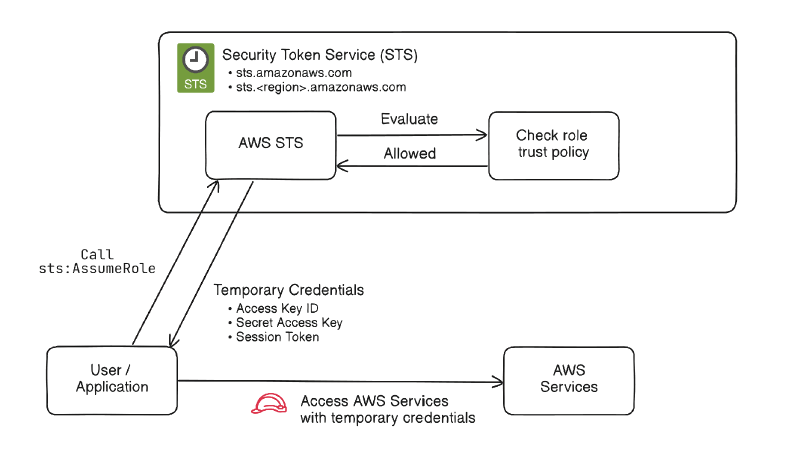
⚙️ How AssumeRole works

STS-AssumeRole

  1. A user, application, or AWS service requests to assume an IAM role.
  2. AWS checks the role’s trust policy to determine whether the requester is allowed.
  3. If allowed, STS returns temporary credentials:
    • Access key ID
    • Secret access key
    • Session token
  4. The requester uses those temporary credentials to access AWS resources.
  5. The credentials expire after the session duration.

🚀 Use Cases

  • Cross-account access
  • CI/CD Pipelines
  • AWS workloads: EKS, EC2, .. etc
  • Temporary elevated access

💻 Terraform Example

This example demonstrates a common STS-based access pattern: an EC2 instance receives temporary role credentials and uses them to access S3 securely without embedded access keys.
  1
  2
  3
  4
  5
  6
  7
  8
  9
 10
 11
 12
 13
 14
 15
 16
 17
 18
 19
 20
 21
 22
 23
 24
 25
 26
 27
 28
 29
 30
 31
 32
 33
 34
 35
 36
 37
 38
 39
 40
 41
 42
 43
 44
 45
 46
 47
 48
 49
 50
 51
 52
 53
 54
 55
 56
 57
 58
 59
 60
 61
 62
 63
 64
 65
 66
 67
 68
 69
 70
 71
 72
 73
 74
 75
 76
 77
 78
 79
 80
 81
 82
 83
 84
 85
 86
 87
 88
 89
 90
 91
 92
 93
 94
 95
 96
 97
 98
 99
100
101
102
103
104
105
106
107
108
109
110
111
112
113
114
115
116
117
118
119
120
121
122
123
124
125
126
127
128
129
130
131
132
133
134
135
136
137
138
139
140
141
142
provider "aws" {
  region = "ap-northeast-2"
}

# --------------------------------------------------
# S3 bucket
# --------------------------------------------------
resource "aws_s3_bucket" "app_bucket" {
  # bucket name must be unique
  bucket = "my-sts-demo-bucket-1234567890"
}

resource "aws_s3_bucket_public_access_block" "app_bucket" {
  bucket = aws_s3_bucket.app_bucket.id

  block_public_acls       = true
  block_public_policy     = true
  ignore_public_acls      = true
  restrict_public_buckets = true
}

# --------------------------------------------------
# IAM role for EC2
# EC2 can assume this role
# --------------------------------------------------
data "aws_iam_policy_document" "ec2_assume_role" {
  statement {
    effect = "Allow"

    actions = ["sts:AssumeRole"]

    principals {
      type        = "Service"
      identifiers = ["ec2.amazonaws.com"]
    }
  }
}

resource "aws_iam_role" "ec2_s3_role" {
  name               = "ec2-s3-access-role"
  # Trust Policy
  assume_role_policy = data.aws_iam_policy_document.ec2_assume_role.json
}

# --------------------------------------------------
# Policy: allow EC2 role to read objects from S3
# --------------------------------------------------
data "aws_iam_policy_document" "s3_read_policy" {
  statement {
    effect = "Allow"

    actions = [
      "s3:ListBucket"
    ]

    resources = [
      aws_s3_bucket.app_bucket.arn
    ]
  }

  statement {
    effect = "Allow"

    actions = [
      "s3:GetObject"
    ]

    resources = [
      "${aws_s3_bucket.app_bucket.arn}/*"
    ]
  }
}

resource "aws_iam_policy" "s3_read_policy" {
  name   = "ec2-s3-read-policy"
  policy = data.aws_iam_policy_document.s3_read_policy.json
}

resource "aws_iam_role_policy_attachment" "attach_s3_read" {
  role       = aws_iam_role.ec2_s3_role.name
  policy_arn = aws_iam_policy.s3_read_policy.arn
}

# --------------------------------------------------
# Instance profile for EC2
# --------------------------------------------------
resource "aws_iam_instance_profile" "ec2_profile" {
  name = "ec2-s3-instance-profile"
  role = aws_iam_role.ec2_s3_role.name
}

# --------------------------------------------------
# Networking (simple example)
# Replace with your existing VPC/subnet/security group if needed
# --------------------------------------------------
data "aws_vpc" "default" {
  default = true
}

data "aws_subnets" "default" {
  filter {
    name   = "vpc-id"
    values = [data.aws_vpc.default.id]
  }
}

resource "aws_security_group" "ec2_sg" {
  name        = "ec2-s3-demo-sg"
  description = "Security group for EC2 S3 demo"
  vpc_id      = data.aws_vpc.default.id

  ingress {
    description = "SSH"
    from_port   = 22
    to_port     = 22
    protocol    = "tcp"
    cidr_blocks = ["0.0.0.0/0"]
  }

  egress {
    from_port   = 0
    to_port     = 0
    protocol    = "-1"
    cidr_blocks = ["0.0.0.0/0"]
  }
}

# --------------------------------------------------
# EC2 instance
# Replace ami with one valid in your region
# --------------------------------------------------
resource "aws_instance" "app" {
  ami                    = var.ami
  instance_type          = "t3.micro"
  subnet_id              = data.aws_subnets.default.ids[0]
  vpc_security_group_ids = [aws_security_group.ec2_sg.id]
  iam_instance_profile   = aws_iam_instance_profile.ec2_profile.name

  tags = {
    Name = "sts-demo-ec2"
  }
}

👍 Best Practices

  • Prefer temporary credentials over long-lived access keys
  • Follow least privilege when defining role permissions
  • Use clear trust policies and avoid overly broad principals
  • Set appropriate session durations
  • Use external IDs when granting third-party cross-account access
  • Monitor role usage with CloudTrail

📚 References

Built with Hugo
Theme Stack designed by Jimmy