🌯 Introduction
I had used Amazon EKS during the K-DT(Digital Training) program last summer, but I was not responsible for building or operating the cluster myself.
In my current project, I had full ownership of the AWS infrastructure, so I needed to design and provision the EKS cluster on my own.
At First, I considered using terraform-aws-modules/eks/aws module.
However, it felt too abstract for my use case, and the large number of input variables made it harder for me to understnad what was actually being created.
Instead of relying on a highly abstracted module, I decided to build the EKS cluster using my own smaller Terraform modules.
This approach helped me to understand each component more clearly and gave me more control over the infrastructure design.
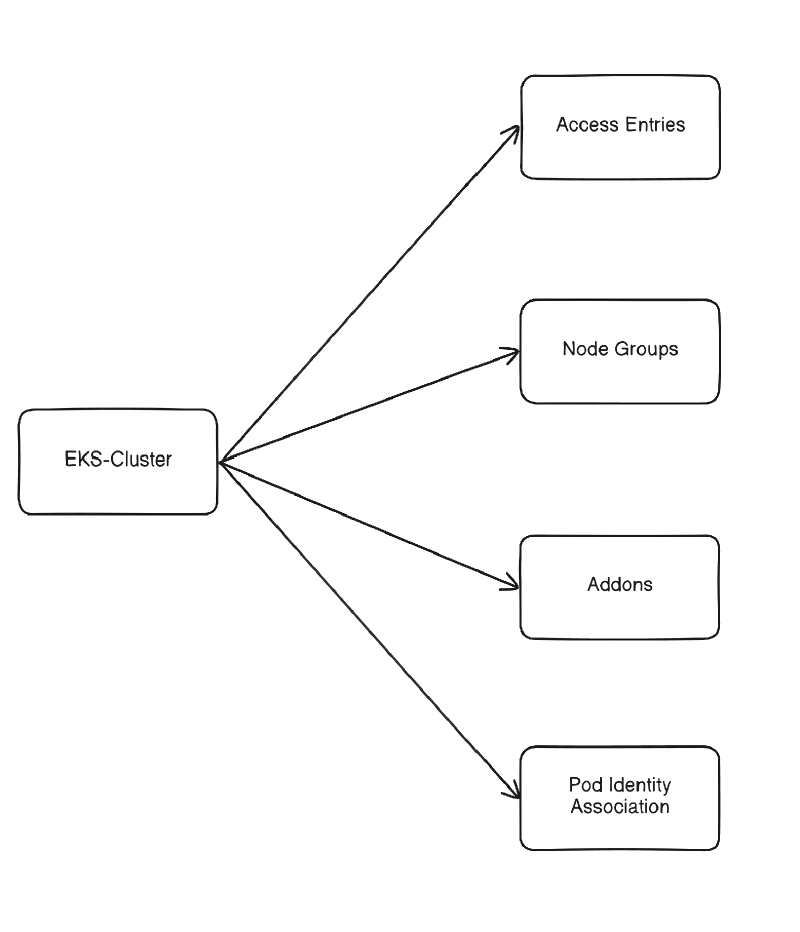
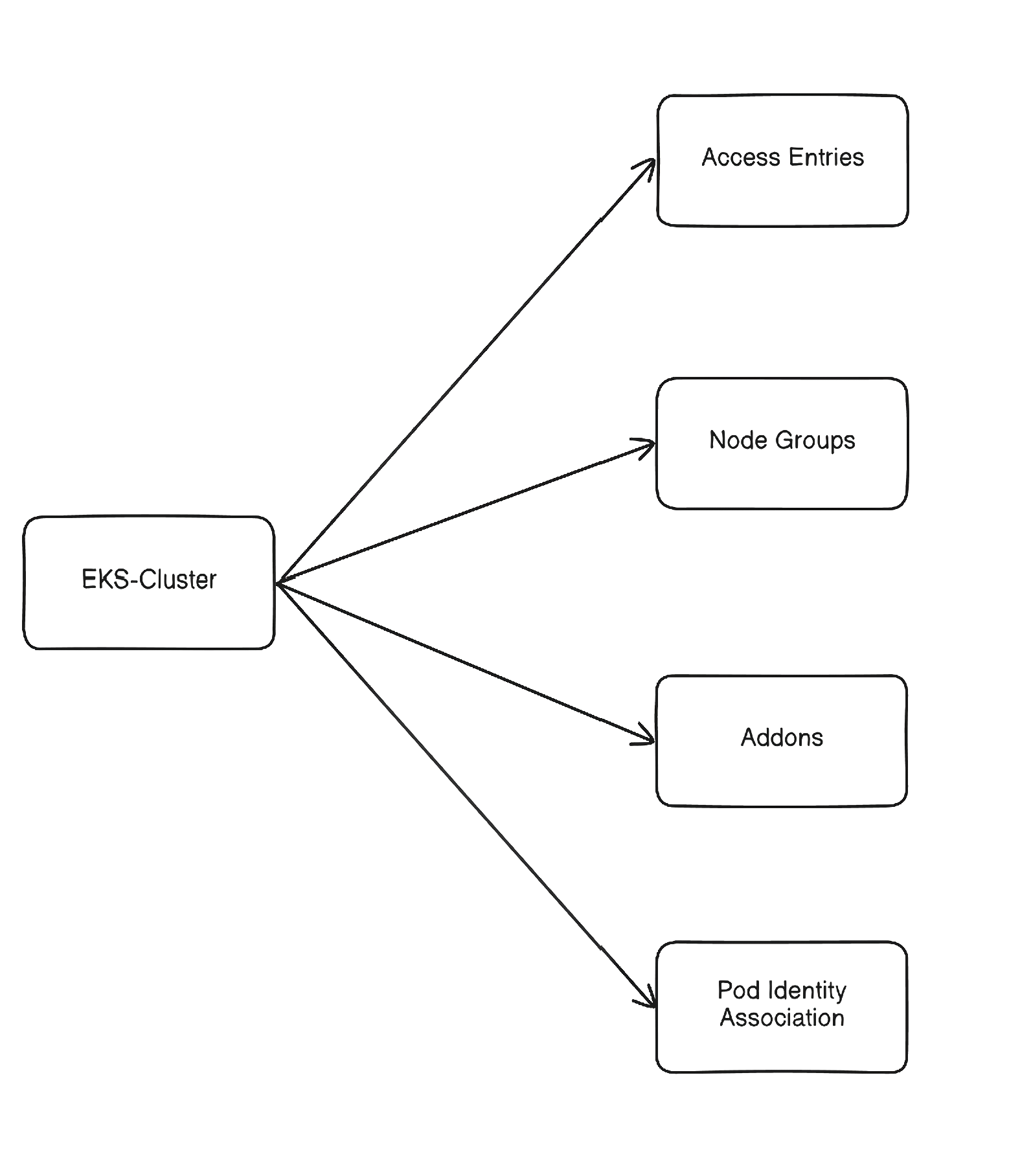
The diagram below shows the dependencies of modules.
❓ What is Amazon EKS?
Amazon EKS(Elastic Kubernetes Service) is AWS’s managed Kubernetes service.
It allows you to run Kubernetes on AWS without having to manage the control plane yourself.
When running on Kubernetes in a public cloud environment, using a managed service is usually a better choice than building and operating a cluster directly on virtual machines.
A managed service reduces operational burden and provies tighter integration with the cloud platform.
Some of the main benefits are:
- managed control plane operations
- easier node scaling and lifecycle management
- built-in networking integration with VPC, Load Balancer, and CNI
- integration with AWS services such as IAM, CloudWatch, and EBS
EKS Standard vs Auto Mode
Amazon EKS has two main approaches:
- EKS Standard
- AWS manages the control plane
- You manage more of the cluster components yourself
- node groups, addons, and others
- EKS Auto Mode
- AWS manages more of the operational details automatically
- it comes with additional fees
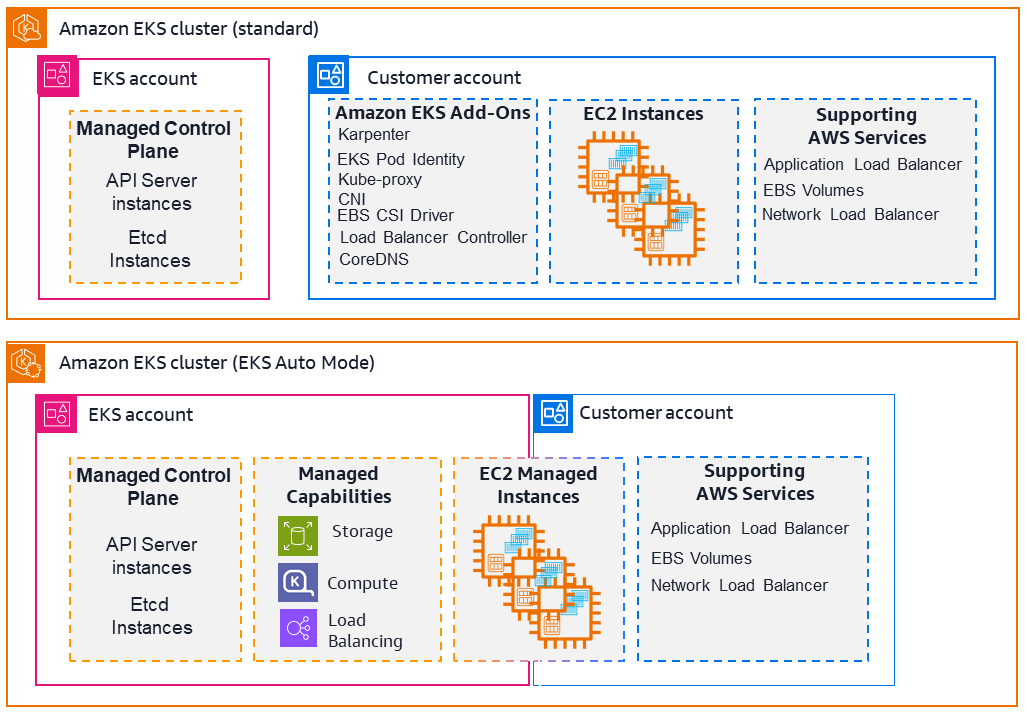
This post focuses on EKS Standard because I wanted to avoid the extra cost of Auto Mode and keep the infrastructure design explicit.
Since this project was also a learning opportunity, managing the building block myself helped me understand EKS more deeply.
🧀 EKS Cluster
This module creates the core EKS control plane.
It is responsible for provisioning the cluster itself, the IAM role used by EKS, and the network configuration for the cluster API endpoint.
I designed it to keep the cluster behavior explicit, especially around private access, control plane logging, and Auto Mode settings.
main.tf
The main part is aws_eks_cluster resource, which defines the EKS control plane.
One design choice here is support for private mode.
When enabled, the Kubernetes API endpoint is exposed privately instead of publicly.
In that case, I also create a dedicated security group and allow HTTPS access(Kubernetes API) from within the VPC so that internal resources, such as a bastion host, can reach the cluster API safely.
In access_config, I set authentication_mode = "API" so that cluster access can be managed through EKS access entries, instead of the legacy aws-auth ConfigMap.
The module also creates an IAM role for the EKS control plane and attaches the required AWS-managed policy.
This role allows EKS to interact with other AWS services as part of cluster operation.
By default, EKS cluster encrypts secrets at rest.
If you want to make secrets to be encrypted with CMK(Customer Managed Key) , you can use encryption_config block.
Visit here for more informations.
 1
 2
 3
 4
 5
 6
 7
 8
 9
10
11
12
13
14
15
16
17
18
19
20
21
22
23
24
25
26
27
28
29
30
31
32
33
34
35
36
37
38
39
40
41
42
43
44
45
46
47
48
49
50
51
52
53
54
55
56
57
58
59
60
61
62
63
64
65
66
67
68
69
70
71
72
73
74
75
76
77
78
| resource "aws_security_group" "eks_control_plane_access" {
count = var.private_mode ? 1 : 0
name = "${var.cluster_name}-eks-control-plane-access"
description = "Allow bastion to reach EKS private API"
vpc_id = var.vpc_id
}
resource "aws_vpc_security_group_ingress_rule" "eks_api_from_vpc" {
count = var.private_mode ? 1 : 0
security_group_id = aws_security_group.eks_control_plane_access[0].id
cidr_ipv4 = var.vpc_cidr
ip_protocol = "tcp"
from_port = 443
to_port = 443
}
resource "aws_eks_cluster" "eks" {
name = var.cluster_name
access_config {
authentication_mode = "API"
}
role_arn = aws_iam_role.eks.arn
version = var.kubernetes_version
bootstrap_self_managed_addons = var.bootstrap_self_managed_addons
enabled_cluster_log_types = var.enabled_cluster_log_types
vpc_config {
subnet_ids = var.subnet_ids
endpoint_public_access = !var.private_mode
endpoint_private_access = var.private_mode
security_group_ids = aws_security_group.eks_control_plane_access[*].id
}
# Disable Auto-Mode
compute_config {
enabled = false
}
control_plane_scaling_config {
tier = var.cp_scaling_tier
}
upgrade_policy {
support_type = "STANDARD"
}
depends_on = [aws_iam_role_policy_attachment.cluster_AmazonEKSClusterPolicy]
}
# IAM Role for Contorl Plane
resource "aws_iam_role" "eks" {
name = "${var.cluster_name}-role"
assume_role_policy = jsonencode({
Version = "2012-10-17"
Statement = [
{
Action = [
"sts:AssumeRole",
"sts:TagSession"
]
Effect = "Allow"
Principal = {
Service = "eks.amazonaws.com"
}
},
]
})
}
resource "aws_iam_role_policy_attachment" "cluster_AmazonEKSClusterPolicy" {
policy_arn = "arn:aws:iam::aws:policy/AmazonEKSClusterPolicy"
role = aws_iam_role.eks.name
}
|
variables.tf
 1
 2
 3
 4
 5
 6
 7
 8
 9
10
11
12
13
14
15
16
17
18
19
20
21
22
23
24
25
26
27
28
29
30
31
32
33
34
35
36
37
38
39
40
41
42
43
44
45
46
47
48
49
50
51
52
53
| variable "cluster_name" {
description = "EKS cluster name"
type = string
}
variable "kubernetes_version" {
description = "EKS version"
type = string
}
variable "bootstrap_self_managed_addons" {
description = "Wheter to Enable VPC CNI and kube-proxy"
type = bool
default = true
}
variable "vpc_id" {
description = "VPC ID"
type = string
}
variable "vpc_cidr" {
description = "VPC CIDR Block"
type = string
}
variable "subnet_ids" {
description = "Subnet IDs"
type = list(string)
}
variable "private_mode" {
description = "Enable EKS private access"
type = string
}
variable "cp_scaling_tier" {
description = "Scaling tier for Control Plane"
type = string
default = "standard"
}
variable "enabled_cluster_log_types" {
type = set(string)
default = []
validation {
condition = alltrue([
for t in var.enabled_cluster_log_types :
contains(["api", "audit", "authenticator", "controllerManager", "scheduler"], t)
])
error_message = "enabled_cluster_log_types must contain only valid EKS control plane log types."
}
}
|
outputs.tf
By default, Cluster security group is created by default.
For more informations, see here .
 1
 2
 3
 4
 5
 6
 7
 8
 9
10
11
12
13
14
15
16
17
18
19
| output "cluster_name" {
value = aws_eks_cluster.eks.name
}
output "endpoint" {
value = aws_eks_cluster.eks.endpoint
}
output "ca_certificate" {
value = aws_eks_cluster.eks.certificate_authority[0].data
}
output "arn" {
value = aws_eks_cluster.eks.arn
}
output "cluster_security_group_id" {
value = aws_eks_cluster.eks.vpc_config[0].cluster_security_group_id
}
|
🔑 Access Entries
Since this cluster uses authentication_mode = "API", cluster access is managed through EKS access entries instead of the legacy aws-auth ConfigMap.
The difference is where access is managed. With aws-auth, IAM-to-Kubernetes mappings are stored inside the cluster as a Kubernetes ConfigMap.
With access entries, the same kind of access management is defined through AWS-managed EKS resources.
Newer model is preferred because it fits IaC-based infrastructure management much better and keeps cluster access configuration aligned with the AWS control plane.
Granting access through assumed IAM roles rather than IAM users is also recommended.
In practice, this means an engineer first assumes a role and then uses that role to access the cluster.
This is a better fit for operational environments because roles provide temporary credentials, while IAM users are usually tied to long-lived credentials.
From both a security and management perspective, using roles is the more natural approach.
For an IAM user to assume an IAM role, the user needs permission to call sts:AssumeRole on the role, and the role’s trust policy must allow that user.
Another important point is that EKS access scope in access policy association do not replace Kubernetes RBAC.
Access scope is just a simple access-control scope which is managed by AWS, while Kubernetes RBAC still works in cluster itself.
These two layers can work together.
In this module, I can optionally assign kubernetes_groups to the principal so that the access entry can integrate with native Kubernetes RBAC when more fine-grained authorization is needed.
For more information, visit here
This module is built around two main resources:
aws_eks_access_entry, which registers an IAM principal with the clusteraws_eks_access_policy_association, which attaches one or more EKS access policies to that principal
main.tf
The aws_eks_access_entry resource creates the access entry for a single IAM principal.
After that, aws_eks_access_policy_association resources are created from a map variable, which makes it possible to attach multiple policies to the same principal. \
Each policy association also defines its access scope.
Depending on the configuration, access can be granted either at the cluster level or only for specific namespaces. \
 1
 2
 3
 4
 5
 6
 7
 8
 9
10
11
12
13
14
15
16
17
18
| resource "aws_eks_access_entry" "access" {
cluster_name = var.cluster_name
principal_arn = var.principal_arn
kubernetes_groups = var.kubernetes_groups
}
resource "aws_eks_access_policy_association" "access" {
for_each = var.eks_access_policy_association
cluster_name = var.cluster_name
principal_arn = var.principal_arn
policy_arn = each.value.policy_arn
access_scope {
type = each.value.access_scope_type
namespaces = each.value.namespaces
}
}
|
variables.tf
 1
 2
 3
 4
 5
 6
 7
 8
 9
10
11
12
13
14
15
16
17
18
19
20
21
22
23
24
25
26
27
28
29
30
31
| variable "cluster_name" {
description = "EKS cluster name"
type = string
}
variable "principal_arn" {
description = "IAM role ARN registering access policy"
type = string
}
variable "kubernetes_groups" {
description = "List of Kubernetes groups to assign to the principal"
type = list(string)
default = []
}
variable "eks_access_policy_association" {
type = map(object({
policy_arn = string
access_scope_type = string
namespaces = optional(list(string))
}))
default = {}
validation {
condition = alltrue([
for t in var.eks_access_policy_association :
contains(["namespace", "cluster"], t.access_scope_type)
])
error_message = "eks_access_policy_association must contain only 'namespace' or 'cluster'"
}
}
|
👪 Node Groups
EKS managed node groups automate the provisioning and lifecycle management of worker nodes.
This module has more input variables than some of the earlier modules because node groups tend to vary a lot depending on workload requirements.
Instance type, capacity model, scaling limits, labels, taints, and disk size can all change depending on how the cluster is intended to be used.
Worker nodes also need a role with the required AWS permissoins.
At minimum, the nodes need policies such as AmazonEKSWorkerNodePolicy and AmazonEC2ContainerRegistryPullOnly so that they can join the cluster and pull container images from Amazon ECR.
main.tf
The core resource in this module is aws_eks_node_group, which craetes a managed node group attached to the cluster.
I exposed Kubernetes-specific scheduling options through labels and taints.
These settings are important when different workloads need to be separated across different groups of nodes.
For example, some nodes may be dedicated to system workloads, while others may be reserved for specific applications or cost-optimized Spot workloads.
Another detail is the lifecycle block ignoring changes to desired_size.
I added this because the desired number of nodes may change dynamically during operation, and I did not want Terraform to constantly treat that runtime scaling state as drift.
 1
 2
 3
 4
 5
 6
 7
 8
 9
10
11
12
13
14
15
16
17
18
19
20
21
22
23
24
25
26
27
28
29
30
31
32
33
34
35
36
37
38
39
40
41
42
43
44
45
46
47
48
49
50
51
52
53
54
55
56
| resource "aws_eks_node_group" "ng" {
cluster_name = var.cluster_name
node_group_name = var.node_group_name
node_role_arn = aws_iam_role.ng.arn
ami_type = var.ami_type
instance_types = var.instance_types
subnet_ids = var.subnet_ids
capacity_type = var.capacity_type
disk_size = var.disk_size
scaling_config {
desired_size = var.scaling.desired_size
min_size = var.scaling.min_size
max_size = var.scaling.max_size
}
labels = var.labels
dynamic "taint" {
for_each = var.taints
content {
key = taint.value.key
value = taint.value.value
effect = taint.value.effect
}
}
lifecycle {
ignore_changes = [scaling_config[0].desired_size]
}
depends_on = [aws_iam_role_policy_attachment.ng_attachment]
}
resource "aws_iam_role" "ng" {
name = "${var.node_group_name}-role"
assume_role_policy = jsonencode({
Version = "2012-10-17"
Statement = [{
Action = "sts:AssumeRole"
Effect = "Allow"
Principal = {
Service = "ec2.amazonaws.com"
}
}]
})
}
resource "aws_iam_role_policy_attachment" "ng_attachment" {
for_each = var.role_policy_attachment
policy_arn = each.value
role = aws_iam_role.ng.name
}
|
variables.tf
 1
 2
 3
 4
 5
 6
 7
 8
 9
10
11
12
13
14
15
16
17
18
19
20
21
22
23
24
25
26
27
28
29
30
31
32
33
34
35
36
37
38
39
40
41
42
43
44
45
46
47
48
49
50
51
52
53
54
55
56
57
58
59
60
61
62
63
64
65
66
67
68
69
70
71
72
73
74
75
76
77
78
79
80
81
82
83
84
85
86
87
88
89
90
91
| variable "cluster_name" {
description = "Name of EKS Cluster"
type = string
}
variable "node_group_name" {
description = "Name of node group"
type = string
}
variable "subnet_ids" {
description = "ID list of subnet"
type = list(string)
}
variable "ami_type" {
description = "Type of AMI"
type = string
validation {
condition = contains([
"AL2_x86_64", "AL2_x86_64_GPU", "AL2_ARM_64", "CUSTOM",
"BOTTLEROCKET_ARM_64", "BOTTLEROCKET_x86_64",
"BOTTLEROCKET_ARM_64_FIPS", "BOTTLEROCKET_x86_64_FIPS",
"BOTTLEROCKET_ARM_64_NVIDIA", "BOTTLEROCKET_x86_64_NVIDIA",
"BOTTLEROCKET_ARM_64_NVIDIA_FIPS", "BOTTLEROCKET_x86_64_NVIDIA_FIPS",
"WINDOWS_CORE_2019_x86_64", "WINDOWS_FULL_2019_x86_64",
"WINDOWS_CORE_2022_x86_64", "WINDOWS_FULL_2022_x86_64",
"WINDOWS_CORE_2025_x86_64", "WINDOWS_FULL_2025_x86_64",
"AL2023_x86_64_STANDARD", "AL2023_ARM_64_STANDARD",
"AL2023_x86_64_NEURON", "AL2023_x86_64_NVIDIA", "AL2023_ARM_64_NVIDIA"
], var.ami_type)
error_message = "amiType does not match. check: https://docs.aws.amazon.com/eks/latest/APIReference/API_Nodegroup.html#AmazonEKS-Type-Nodegroup-amiType"
}
}
variable "instance_types" {
description = "List of instance type"
type = list(string)
}
variable "capacity_type" {
description = "Node Capacity Type"
type = string
validation {
condition = contains(["ON_DEMAND", "SPOT"], var.capacity_type)
error_message = "Valid value: <ON_DEMAND | SPOT>"
}
}
variable "disk_size" {
description = "Disk size for each worker node"
type = number
default = 20
}
variable "scaling" {
description = "Scaling Capacity"
type = object({
desired_size = number
min_size = number
max_size = number
})
}
variable "labels" {
description = "Node labels"
type = map(string)
}
variable "taints" {
description = "Taints for rule"
type = map(object({
key = string
value = optional(string)
effect = string
}))
validation {
condition = alltrue([
for _, v in var.taints :
contains(["NO_SCHEDULE", "NO_EXECUTE", "PREFER_NO_SCHEDULE"], v.effect)
])
error_message = "Valid effect: <NO_SCHEDULE | NO_EXECUTE | PREFER_NO_SCHEDULE>"
}
}
variable "role_policy_attachment" {
description = "Role policies to attach nodes"
type = set(string)
default = []
}
|
📲 Addons
Compared to the other parts of this EKS setup, add-ons are relatively simple.
In Terraform, an EKS add-on can be created with a single aws_eks_addon resource, so this is one of the few cases where creating a separate module is optional.
I still separated it into its own module for consistency. \
Since the rest of the cluster is also organized into small building blocks, keeping add-ons in a dedicated module made the overall structure easier to understand and extend later.
main.tf
1
2
3
4
| resource "aws_eks_addon" "addon" {
cluster_name = var.cluster_name
addon_name = var.addon_name
}
|
variables.tf
1
2
3
4
5
6
7
8
9
| variable "cluster_name" {
description = "Name of EKS Cluster"
type = string
}
variable "addon_name" {
description = "Name of Addon"
type = string
}
|
⛓️ Pod Identity Associations
EKS Pod Identity allows pods to access AWS services using IAM roles, without storing AWS credentials inside containers.
The idea is similar to how an EC2 instance profile provides credentials to an EC2 instance, but in this case the identity is assigned to a Kuberentes workload.
Instead of distributing static AWS credentials to applications or reusing the worker node’s IAM role, I associate a dedicated IAM role with a Kubernetes service account.
Pods that use that service account can then access AWS resources with only the permessions they actually need.
This is useful because it keeps AWS permission scoped at the workload level rather than the node level.
In other words, different applications in the same cluster can use different IAM roles depending on their responsiblities.
main.tf
First, this module creates IAM role that can be assumed by EKS pods.
Then it attaches the IAM policy that defines what the workload is allowed to do in AWS.
Finally, it creates the pod identity association that connects the IAM role to a specific Kubernetes service account in a specific namespace.
Pod identity agent is deployed by daemonset, providing pods to get its credentials from IAM role.
 1
 2
 3
 4
 5
 6
 7
 8
 9
10
11
12
13
14
15
16
17
18
19
20
21
22
23
24
25
26
27
28
29
30
31
| resource "aws_iam_role" "pod" {
name = var.role_name
assume_role_policy = jsonencode({
Version = "2012-10-17"
Statement = [
{
Effect = "Allow"
Principal = {
Service = "pods.eks.amazonaws.com"
}
Action = [
"sts:AssumeRole",
"sts:TagSession"
]
}
]
})
}
resource "aws_iam_role_policy_attachment" "pod" {
role = aws_iam_role.pod.name
policy_arn = var.policy_arn
}
resource "aws_eks_pod_identity_association" "association" {
cluster_name = var.cluster_name
namespace = var.namespace
service_account = var.service_account
role_arn = aws_iam_role.pod.arn
}
|
variables.tf
 1
 2
 3
 4
 5
 6
 7
 8
 9
10
11
12
13
14
15
16
17
18
19
20
21
22
23
24
| variable "cluster_name" {
description = "Name of EKS Cluster"
type = string
}
variable "role_name" {
description = "IAM role name to assign pod"
type = string
}
variable "policy_arn" {
description = "IAM policy arn"
type = string
}
variable "namespace" {
description = "Kubernetes namespace"
type = string
}
variable "service_account" {
description = "Name of serviceAccount"
type = string
}
|
🚪 (Optional) Bastion Host
When the EKS cluster runs in private API mode, the Kubernetes API endpoint is not exposed to the public internet.
That means cluster administration has to be performed from somewhere inside the VPC or from a connected network.
A bastion host is one way to solve that problem, but it is not the only option.
Other approaches, such as Client VPC or Site-to-Site VPN, can also provide private connectivity to the cluster.
In this project, however, I chose a bastino host combined with AWS Systems Manager Session Manager.
Because VPN services are too expensive and increase operational overheads.
main.tf
This module creates a small EC2 instance that acts as an administrative entry point into the private network.
The instance itself is intentionally simple: it uses a minimal security group, an IAM instance profile for Systems Manager access, and a small amount of bootstrap configuration through user_data.
One design choice I like here is avoiding traditional SSH-based bastion access.
Instead of opening inbound SSH, the instance is managed through SSM Session Manager.
This keeps inbound access closed while still allowing interactive administration when needed.
In practice, that reduces operational overhead compared to managing SSH keys and security group ingress rules.
I also attached a small custom IAM policy that allows the bastion to call eks:DescribeCluster.
This is useful because tools such as aws eks update-kubeconfig rely on EKS cluster metadata in order to build client configuration for kubectl.
  1
  2
  3
  4
  5
  6
  7
  8
  9
 10
 11
 12
 13
 14
 15
 16
 17
 18
 19
 20
 21
 22
 23
 24
 25
 26
 27
 28
 29
 30
 31
 32
 33
 34
 35
 36
 37
 38
 39
 40
 41
 42
 43
 44
 45
 46
 47
 48
 49
 50
 51
 52
 53
 54
 55
 56
 57
 58
 59
 60
 61
 62
 63
 64
 65
 66
 67
 68
 69
 70
 71
 72
 73
 74
 75
 76
 77
 78
 79
 80
 81
 82
 83
 84
 85
 86
 87
 88
 89
 90
 91
 92
 93
 94
 95
 96
 97
 98
 99
100
101
102
103
104
105
106
107
108
109
110
111
112
113
114
| data "aws_ami" "ubuntu" {
most_recent = true
filter {
name = "name"
values = ["ubuntu/images/hvm-ssd-gp3/ubuntu-noble-24.04-arm64-server-*"]
}
filter {
name = "virtualization-type"
values = ["hvm"]
}
owners = ["099720109477"] # Canonical
}
resource "aws_security_group" "bastion" {
name = "bastion_ssm"
description = "Deny inbound traffic and allow outbound traffic"
vpc_id = var.vpc_id
}
resource "aws_vpc_security_group_egress_rule" "bastion_internet" {
security_group_id = aws_security_group.bastion.id
cidr_ipv4 = "0.0.0.0/0"
from_port = 443
ip_protocol = "tcp"
to_port = 443
}
resource "aws_iam_instance_profile" "ssm" {
name = "${var.name}-profile"
role = aws_iam_role.bastion.id
}
resource "aws_instance" "bastion" {
ami = data.aws_ami.ubuntu.id
instance_type = var.instance_type
subnet_id = var.subnet_id
vpc_security_group_ids = [aws_security_group.bastion.id]
associate_public_ip_address = var.associate_public_ip_address
iam_instance_profile = aws_iam_instance_profile.ssm.name
metadata_options {
http_tokens = "required"
}
root_block_device {
encrypted = true
volume_type = "gp3"
}
user_data = file("${path.module}/user_data.sh")
user_data_replace_on_change = true
tags = {
Name = var.name
}
}
resource "aws_iam_role" "bastion" {
name = var.name
path = "/"
assume_role_policy = jsonencode({
Version = "2012-10-17"
Statement = [
{
Sid = "AllowEC2SSM"
Effect = "Allow"
Action = [
"sts:AssumeRole"
]
Principal = {
Service = "ec2.amazonaws.com"
}
}
]
})
tags = {
Purpose = "Bastion"
}
}
resource "aws_iam_role_policy_attachment" "bastion_ssm" {
role = aws_iam_role.bastion.name
policy_arn = "arn:aws:iam::aws:policy/AmazonSSMManagedInstanceCore"
}
data "aws_iam_policy_document" "bastion_access_eks" {
statement {
sid = "AllowEKStoBastion"
actions = [
"eks:DescribeCluster"
]
resources = [
var.eks_arn
]
}
}
resource "aws_iam_policy" "bastion_access_eks" {
name = "${var.name}-access-eks"
path = "/"
policy = data.aws_iam_policy_document.bastion_access_eks.json
}
resource "aws_iam_role_policy_attachment" "bastion_access_eks" {
role = aws_iam_role.bastion.name
policy_arn = aws_iam_policy.bastion_access_eks.arn
}
|
user_data.sh
It installs useful infra tools, and adds small shell configurations.
This script makes the bastion host to prepared workstation inside the VPC.
 1
 2
 3
 4
 5
 6
 7
 8
 9
10
11
12
13
14
15
16
17
18
19
20
21
22
23
24
25
26
27
28
29
30
31
32
33
34
35
36
37
38
39
40
41
42
43
44
45
46
47
48
49
50
51
52
53
54
55
56
57
58
59
60
61
62
63
64
65
66
| #!/usr/bin/env bash
set -euo pipefail
export DEBIAN_FRONTEND=noninteractive
apt-get update
apt-get upgrade -y
apt-get install -y apt-transport-https ca-certificates curl gnupg unzip
# kubectl
mkdir -p /etc/apt/keyrings
curl -fsSL https://pkgs.k8s.io/core:/stable:/v1.35/deb/Release.key |
gpg --dearmor -o /etc/apt/keyrings/kubernetes-apt-keyring.gpg
echo 'deb [signed-by=/etc/apt/keyrings/kubernetes-apt-keyring.gpg] https://pkgs.k8s.io/core:/stable:/v1.35/deb/ /' \
>/etc/apt/sources.list.d/kubernetes.list
apt-get update
apt-get install -y kubectl
# OpenTofu
install -m 0755 -d /etc/apt/keyrings
curl -fsSL https://get.opentofu.org/opentofu.gpg | tee /etc/apt/keyrings/opentofu.gpg >/dev/null
curl -fsSL https://packages.opentofu.org/opentofu/tofu/gpgkey | gpg --dearmor -o /etc/apt/keyrings/opentofu-repo.gpg
chmod a+r /etc/apt/keyrings/opentofu.gpg /etc/apt/keyrings/opentofu-repo.gpg
cat >/etc/apt/sources.list.d/opentofu.list <<'EOF'
deb [signed-by=/etc/apt/keyrings/opentofu.gpg,/etc/apt/keyrings/opentofu-repo.gpg] https://packages.opentofu.org/opentofu/tofu/any/ any main
deb-src [signed-by=/etc/apt/keyrings/opentofu.gpg,/etc/apt/keyrings/opentofu-repo.gpg] https://packages.opentofu.org/opentofu/tofu/any/ any main
EOF
apt-get update
apt-get install -y tofu
ARCH="$(uname -m)"
case "$ARCH" in
x86_64)
AWSCLI_URL="https://awscli.amazonaws.com/awscli-exe-linux-x86_64.zip"
;;
aarch64 | arm64)
AWSCLI_URL="https://awscli.amazonaws.com/awscli-exe-linux-aarch64.zip"
;;
*)
echo "Unsupported architecture: $ARCH"
exit 1
;;
esac
curl -fsSL "$AWSCLI_URL" -o "awscliv2.zip"
unzip -o awscliv2.zip
./aws/install
# SSM Agent
snap install amazon-ssm-agent --classic || true
systemctl enable snap.amazon-ssm-agent.amazon-ssm-agent.service || true
systemctl restart snap.amazon-ssm-agent.amazon-ssm-agent.service || true
# Shell
curl -fsSL https://starship.rs/install.sh | sh -s -- -y
cat <<'EOF' >>/home/ubuntu/.bashrc
eval "$(starship init bash)"
alias k='kubectl'
EOF
chown ubuntu:ubuntu /home/ubuntu/.bashrc
|
variables.tf
 1
 2
 3
 4
 5
 6
 7
 8
 9
10
11
12
13
14
15
16
17
18
19
20
21
22
23
24
25
26
27
28
29
30
| variable "name" {
description = "Name of the instance"
type = string
}
variable "vpc_id" {
description = "VPC ID"
type = string
}
variable "subnet_id" {
description = "Subnet ID"
type = string
}
variable "instance_type" {
description = "EC2 Instance Type"
type = string
default = "t4g.nano"
}
variable "eks_arn" {
description = "EKS Arn"
type = string
}
variable "associate_public_ip_address" {
description = "Associate public IP address"
type = bool
}
|
outputs.tf
1
2
3
4
5
6
7
| output "bastion_id" {
value = aws_instance.bastion.id
}
output "bastion_role_arn" {
value = aws_iam_role.bastion.arn
}
|
🚀 Using Modules
This is the example of using modules.
  1
  2
  3
  4
  5
  6
  7
  8
  9
 10
 11
 12
 13
 14
 15
 16
 17
 18
 19
 20
 21
 22
 23
 24
 25
 26
 27
 28
 29
 30
 31
 32
 33
 34
 35
 36
 37
 38
 39
 40
 41
 42
 43
 44
 45
 46
 47
 48
 49
 50
 51
 52
 53
 54
 55
 56
 57
 58
 59
 60
 61
 62
 63
 64
 65
 66
 67
 68
 69
 70
 71
 72
 73
 74
 75
 76
 77
 78
 79
 80
 81
 82
 83
 84
 85
 86
 87
 88
 89
 90
 91
 92
 93
 94
 95
 96
 97
 98
 99
100
101
102
103
104
105
106
107
108
109
110
111
112
113
114
115
116
117
118
119
120
121
122
123
124
125
126
127
128
129
130
131
132
133
134
135
136
137
138
139
140
141
142
143
144
145
146
147
148
149
150
151
152
153
154
155
156
157
158
159
160
161
162
163
164
165
166
167
| ##########
# locals #
##########
locals {
vpc_cidr = "10.0.0.0/16"
# Enable/disable EKS private access
eks_private_mode = true
# EKS Addon list
eks_addons = toset([
"coredns",
"kube-proxy",
"vpc-cni",
"aws-ebs-csi-driver",
"eks-pod-identity-agent",
])
# Pod identity associations
pod_identity_associations = {
vpc_cni = {
role_name = "${var.cluster_name}-vpc-cni"
policy_arn = "arn:aws:iam::aws:policy/AmazonEKS_CNI_Policy"
namespace = "kube-system"
service_account = "aws-node"
}
ebs_csi = {
role_name = "${var.cluster_name}-ebs-sci"
policy_arn = "arn:aws:iam::aws:policy/service-role/AmazonEBSCSIDriverPolicy"
namespace = "kube-system"
service_account = "ebs-csi-controller-sa"
}
}
}
########################################################
# EKS - Cluster #
# #
# NOTE: #
# By default, EKS secrets are protected with enveloped #
# encryption in EKS version 1.28 or higher #
########################################################
module "eks_cluster" {
source = "../../../modules/eks-cluster"
cluster_name = var.cluster_name
kubernetes_version = "1.35"
vpc_id = module.vpc.vpc_id
vpc_cidr = local.vpc_cidr
subnet_ids = module.vpc.private_subnet_ids
private_mode = local.eks_private_mode
enabled_cluster_log_types = []
cp_scaling_tier = "standard"
}
######################
# EKS - Access Entry #
######################
module "eks_access_entry_private" {
count = local.eks_private_mode ? 1 : 0
source = "../../../modules/eks-access-entry"
# Use module output instead of var.cluter_name because of the dependency implication.
cluster_name = module.eks_cluster.cluster_name
principal_arn = module.bastion[0].bastion_role_arn
eks_access_policy_association = {
clusteradmin = {
policy_arn = "arn:aws:eks::aws:cluster-access-policy/AmazonEKSClusterAdminPolicy"
access_scope_type = "cluster"
}
}
}
module "eks_access_entry_public" {
count = local.eks_private_mode ? 0 : 1
source = "../../../modules/eks-access-entry"
cluster_name = module.eks_cluster.cluster_name
principal_arn = data.terraform_remote_state.shared.outputs.eks_fullaccess_role_arn
eks_access_policy_association = {
clusteradmin = {
policy_arn = "arn:aws:eks::aws:cluster-access-policy/AmazonEKSClusterAdminPolicy"
access_scope_type = "cluster"
}
}
}
#####################################
# EKS - Node Group #
# Desired Node group size is ignored #
# when comparing the state #
#####################################
module "eks_node_group" {
source = "../../../modules/eks-node-group"
cluster_name = module.eks_cluster.cluster_name
node_group_name = "${var.cluster_name}-ng"
ami_type = "AL2023_ARM_64_STANDARD"
subnet_ids = module.vpc.private_subnet_ids
instance_types = ["t4g.large"]
capacity_type = "ON_DEMAND"
disk_size = 20
scaling = {
desired_size = 2
min_size = 2
max_size = 4
}
labels = {
NodeGroupName = "default"
}
taints = {}
# Role policy Attachment
role_policy_attachment = [
"arn:aws:iam::aws:policy/AmazonEKSWorkerNodePolicy",
"arn:aws:iam::aws:policy/AmazonEC2ContainerRegistryPullOnly"
]
}
################
# EKS - Addons #
################
module "eks-addons" {
source = "../../../modules/eks-addons"
for_each = local.eks_addons
cluster_name = module.eks_cluster.cluster_name
addon_name = each.value
}
###################################
# EKS - Pod identity associations #
###################################
module "pod_identity_association" {
source = "../../../modules/eks-pod-identity-association"
for_each = local.pod_identity_associations
cluster_name = module.eks_cluster.cluster_name
role_name = each.value.role_name
policy_arn = each.value.policy_arn
namespace = each.value.namespace
service_account = each.value.service_account
}
################
# Bastion Host #
################
module "bastion" {
count = local.eks_private_mode ? 1 : 0
source = "../../../modules/ec2-ssm-bastion"
name = "bastion-prod"
vpc_id = module.vpc.vpc_id
subnet_id = module.vpc.private_subnet_ids[0]
instance_type = "t4g.nano"
eks_arn = module.eks_cluster.arn
associate_public_ip_address = false
}
|
🪪 Accessing EKS Cluster
If the EKS cluster exposes a public API endpoint, you can access it directly from your local environment by updating your kubeconfig.
1
2
| # Add --role-arn <role-arn> if you need to assume a role
aws eks update-kubeconfig --region <region> --name <cluster-name>
|
If the cluster runs in private mode, you need to access it from inside the VPC or through a connected private network first.
In my setup, that means starting a session on the bastion host through AWS Systems Manager Session Manager.
1
| aws ssm start-session --target <instance-id>
|
From there, you can run aws eks update-kubeconfig and use kubectl against the private cluster endpoint.
➡️ What Comes Next
Provisioning the EKS cluster itself is only the beginning.
In the standard EKS model, there are still several operational components that often need to be installed separately depending on the environment and workload requirements.
Some common examples are:
- ArgoCD for GitOps-based deployment
- cert-manager for TLS certificate management
- AWS Load Balancer Controller for integrating Kubernetes services with AWS load balancers
- Karpenter for node autoscaling
- Gateway API CRD for newer north-south traffic control management
- Observability Stack
- and so on
You can also consider AWS EKS Capabilities.
📚 References