AWS Security Token Service (STS)의 AssumeRole이 어떻게 AWS 서비스에 접근하는지 알아보자.
🔑 AWS Security Token Service (STS)란?
AWS Security Token Service (STS)는 IAM user 또는 role에 단기자격증명을 부여하는 AWS 서비스이다.
이러한 자격증명은 액세스 키와 같은 장기자격증명의 사용을 줄이고, 최소권한부여를 사용하도록 유도하게 된다.
❓ AWS STS를 쓰는 이유
- AssumeRole을 이용하면, 액세스 키와 같은 장기자격증명을 배포하는 것을 막을 수 있다.
- 임시자격증명은 자동으로 만료되고 롤링되기에, 더 안전하다.
- STS는 다중계정간 자격증명을 교환하는 데에 사용된다.
- 최소권한원칙을 따르기 쉬운 구조이다.
- SSO, OAuth등과 같은 페더레이션을 지원한다.
⚙️ AssumeRole의 동작방식
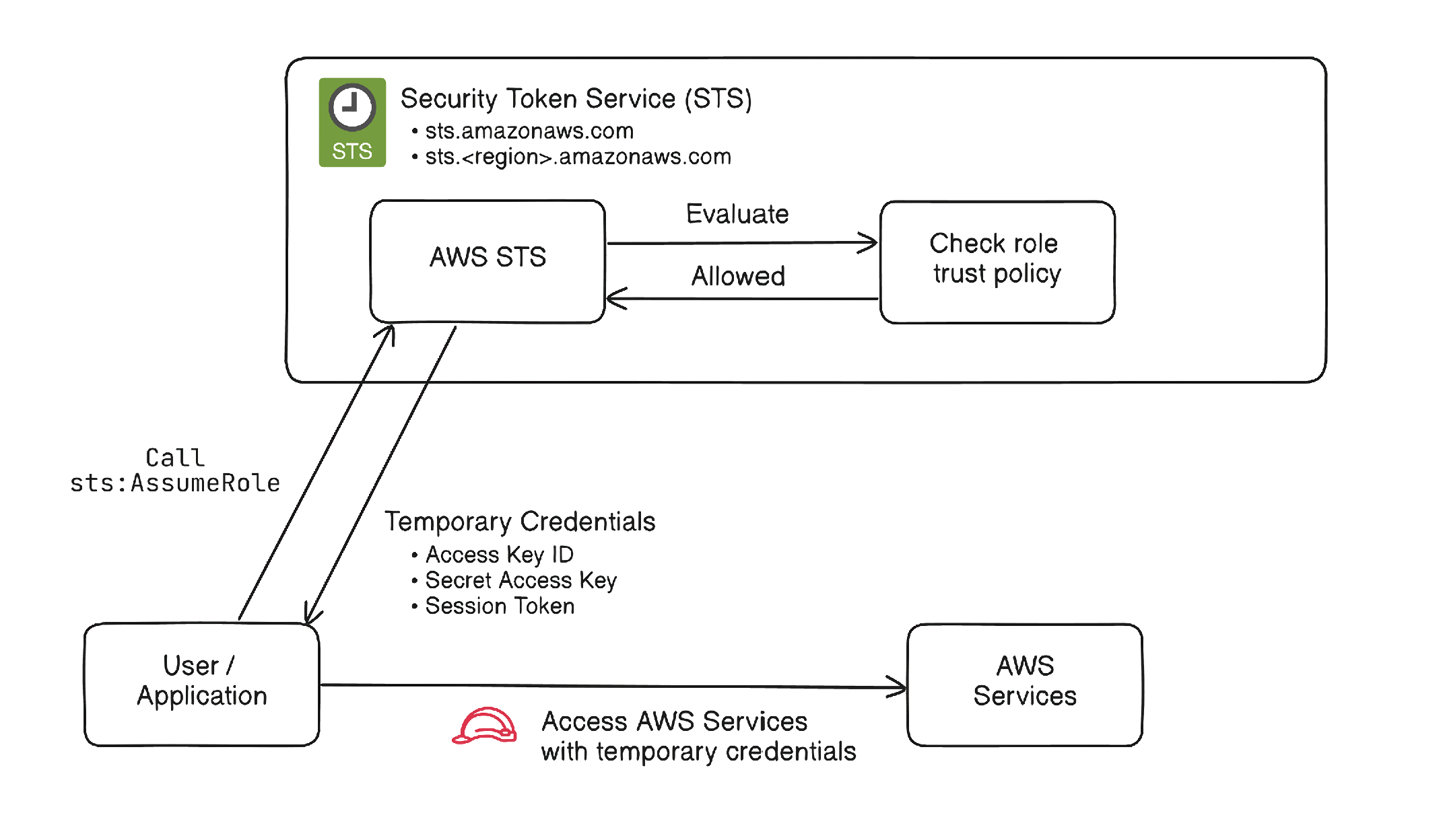
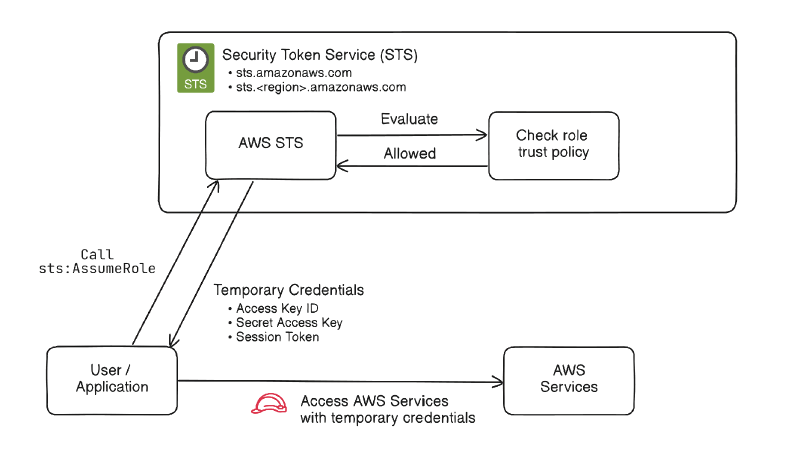
- 사용자, 애플리케이션, 또는 AWS 서비스가 IAM Role을 맡도록 요청을 보낸다.
- AWS는 Role의 신뢰 정책(trust policy) 으로 해당 요청자가 그 Role을 받는 것이 허용되었는지 검사한다.
- 만약 허용된다면, STS는 다음의 임시 자격증명 정보를 제공한다:
- Access key ID
- Secret access key
- Session token
- 요청자는 임시자격증명으로 AWS 자원에 접근할 수 있게 된다.
- 해당 자격증명은 세션 유지기간이후 만료된다.
🚀 유스 케이스
- 다중계정간 액세스
- CI/CD 파이프라인
- AWS 워크로드에 자격증명 부여
- 임시로 권한상승을 받는경우 등
아래 예시는 EC2 인스턴스에 IAM Role로 S3에 접근할 수 있게 되는 예시를 보여준다.
EC2인스턴스에 Access Key ID나 Secrey Access Key를 주지 않고 S3에 접근할 수 있게 된다.
  1
  2
  3
  4
  5
  6
  7
  8
  9
 10
 11
 12
 13
 14
 15
 16
 17
 18
 19
 20
 21
 22
 23
 24
 25
 26
 27
 28
 29
 30
 31
 32
 33
 34
 35
 36
 37
 38
 39
 40
 41
 42
 43
 44
 45
 46
 47
 48
 49
 50
 51
 52
 53
 54
 55
 56
 57
 58
 59
 60
 61
 62
 63
 64
 65
 66
 67
 68
 69
 70
 71
 72
 73
 74
 75
 76
 77
 78
 79
 80
 81
 82
 83
 84
 85
 86
 87
 88
 89
 90
 91
 92
 93
 94
 95
 96
 97
 98
 99
100
101
102
103
104
105
106
107
108
109
110
111
112
113
114
115
116
117
118
119
120
121
122
123
124
125
126
127
128
129
130
131
132
133
134
135
136
137
138
139
140
141
142
| provider "aws" {
region = "ap-northeast-2"
}
# --------------------------------------------------
# S3 bucket
# --------------------------------------------------
resource "aws_s3_bucket" "app_bucket" {
# bucket name must be unique
bucket = "my-sts-demo-bucket-1234567890"
}
resource "aws_s3_bucket_public_access_block" "app_bucket" {
bucket = aws_s3_bucket.app_bucket.id
block_public_acls = true
block_public_policy = true
ignore_public_acls = true
restrict_public_buckets = true
}
# --------------------------------------------------
# IAM role for EC2
# EC2 can assume this role
# --------------------------------------------------
data "aws_iam_policy_document" "ec2_assume_role" {
statement {
effect = "Allow"
actions = ["sts:AssumeRole"]
principals {
type = "Service"
identifiers = ["ec2.amazonaws.com"]
}
}
}
resource "aws_iam_role" "ec2_s3_role" {
name = "ec2-s3-access-role"
# Trust Policy
assume_role_policy = data.aws_iam_policy_document.ec2_assume_role.json
}
# --------------------------------------------------
# Policy: allow EC2 role to read objects from S3
# --------------------------------------------------
data "aws_iam_policy_document" "s3_read_policy" {
statement {
effect = "Allow"
actions = [
"s3:ListBucket"
]
resources = [
aws_s3_bucket.app_bucket.arn
]
}
statement {
effect = "Allow"
actions = [
"s3:GetObject"
]
resources = [
"${aws_s3_bucket.app_bucket.arn}/*"
]
}
}
resource "aws_iam_policy" "s3_read_policy" {
name = "ec2-s3-read-policy"
policy = data.aws_iam_policy_document.s3_read_policy.json
}
resource "aws_iam_role_policy_attachment" "attach_s3_read" {
role = aws_iam_role.ec2_s3_role.name
policy_arn = aws_iam_policy.s3_read_policy.arn
}
# --------------------------------------------------
# Instance profile for EC2
# --------------------------------------------------
resource "aws_iam_instance_profile" "ec2_profile" {
name = "ec2-s3-instance-profile"
role = aws_iam_role.ec2_s3_role.name
}
# --------------------------------------------------
# Networking (simple example)
# Replace with your existing VPC/subnet/security group if needed
# --------------------------------------------------
data "aws_vpc" "default" {
default = true
}
data "aws_subnets" "default" {
filter {
name = "vpc-id"
values = [data.aws_vpc.default.id]
}
}
resource "aws_security_group" "ec2_sg" {
name = "ec2-s3-demo-sg"
description = "Security group for EC2 S3 demo"
vpc_id = data.aws_vpc.default.id
ingress {
description = "SSH"
from_port = 22
to_port = 22
protocol = "tcp"
cidr_blocks = ["0.0.0.0/0"]
}
egress {
from_port = 0
to_port = 0
protocol = "-1"
cidr_blocks = ["0.0.0.0/0"]
}
}
# --------------------------------------------------
# EC2 instance
# Replace ami with one valid in your region
# --------------------------------------------------
resource "aws_instance" "app" {
ami = var.ami
instance_type = "t3.micro"
subnet_id = data.aws_subnets.default.ids[0]
vpc_security_group_ids = [aws_security_group.ec2_sg.id]
iam_instance_profile = aws_iam_instance_profile.ec2_profile.name
tags = {
Name = "sts-demo-ec2"
}
}
|
👍 Best Practices
- 장기 액세스 키 대신 임시자격증명을 이용
- Role의 권한에 최소권한원칙을 적용
- 넓은 principal에게 assume되지 않도록, trust policy를 명확히
- 적절한 세션 길이를 유지
- 외부 계정과 연동 시, external ID를 사용
- CloudTrail로 role사용을 모니터링
📚 References