🌯 Introduction
작년 여름에 K-DT에서 Amazon EKS를 쓴 경험이 있는데, 내가 클러스터를 구축하고 관리하지는 않았었다.
이번 프로젝트에서는 AWS에 대한 전권을 내가 쥐고 있어서, 내가 EKS 클러스터를 구축해야 한다.
처음에는, terraform-aws-modules/eks/aws 모듈을 쓰려고 했다.
그러나, 너무 추상화가 되어있고, 입력 매개변수들이 너무 많아서 이게 어떤 구조인지 이해하기 어려웠다.
그래서 추상화가 이미 된 모듈을 사용하는 대신, 내가 직접 모듈들을 만들어서 EKS 클러스터를 만들어보기로 했다.
직접 모듈을 만들면서 각 컴포넌트의 역할을 더 잘 이해할 수 있었다.
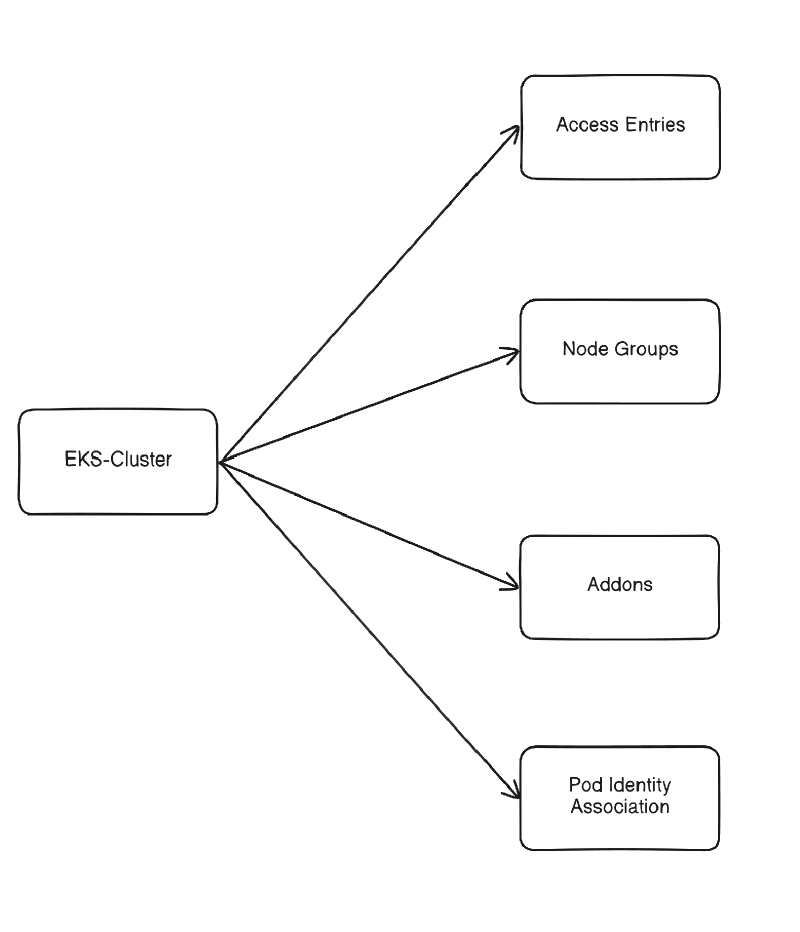
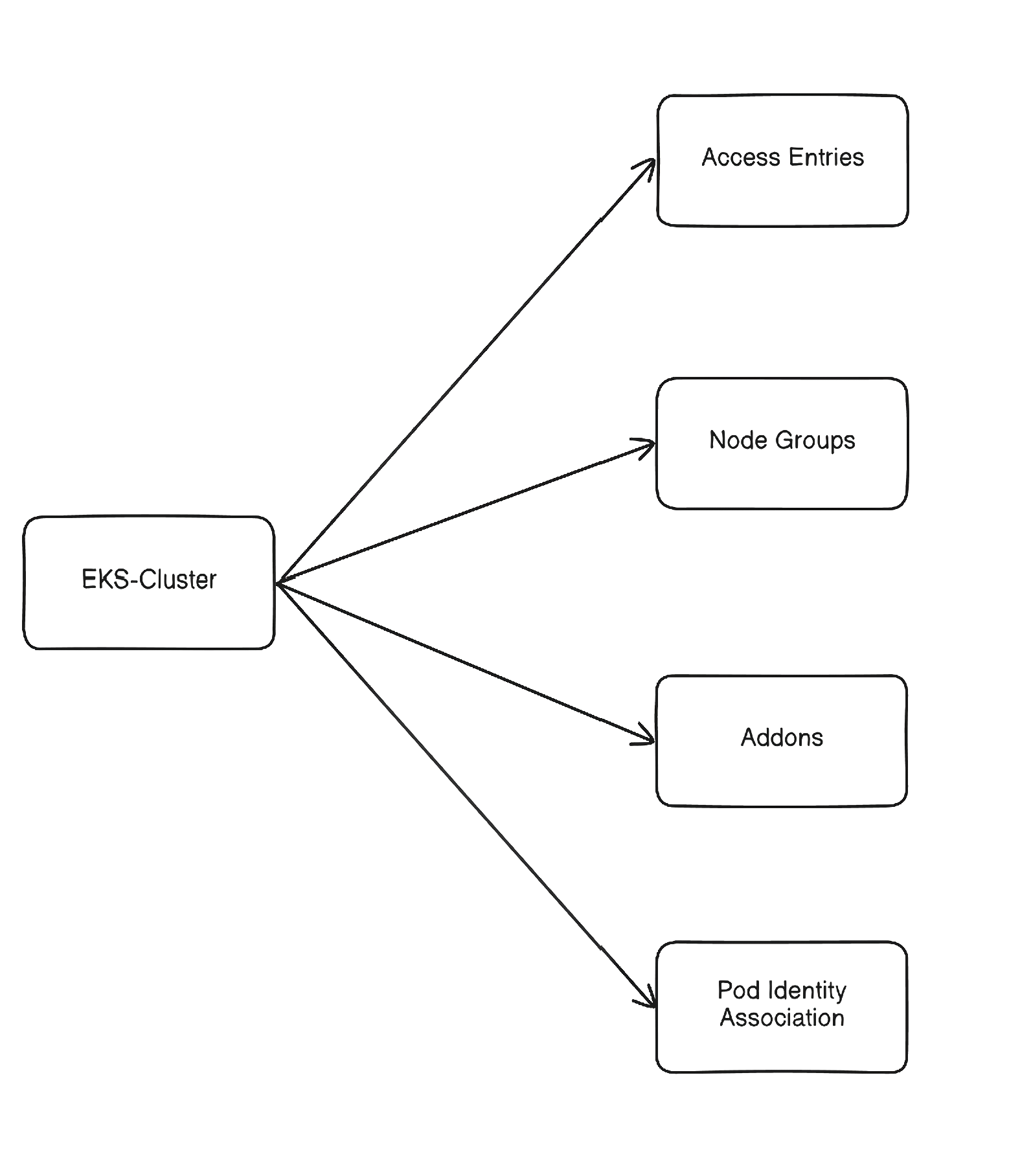
여러 모듈로 구성되어있는데, 의존 관계는 다음과 같다:
❓ Amazon EKS?
Amazon EKS(Elastic Kubernetes Service) 는 AWS의 관리형 Kubernetes 서비스이다.
AWS에서 Kubernetes를 운영하면서, Control Plane을 운영하는 것에 대한 복잡도를 줄여준다.
퍼블릭 클라우드에서 Kubernetes를 운영한다면, 이러한 관리형 서비스를 쓰는 것이 직접 클라우드 VM위에서 띄우는 것보다 좋은 선택이다.
운영 복잡도를 줄이고, 클라우드 플랫폼에서의 통합 기능을 강력하게 이용할 수 있다.
주된 이점들은 다음과 같다:
- Control Plane운영 자동화
- Worker Node의 확장 및 관리
- VPC, 보안그룹, LB, CNI등의 네트워크 설정
- IAM, CloudWatch, EBS등 통합
EKS Standard vs Auto Mode
Amazon EKS 는 두 가지의 주요 옵션이 있다:
- EKS Standard
- AWS 는 Control Plane만 관리
- 직접 클러스터 컴포넌트에 대한 운영 필요
- EKS Auto Mode
- AWS가 여러 운영 기능들을 자동 지원
- 추가 비용이 발생할 수 있음
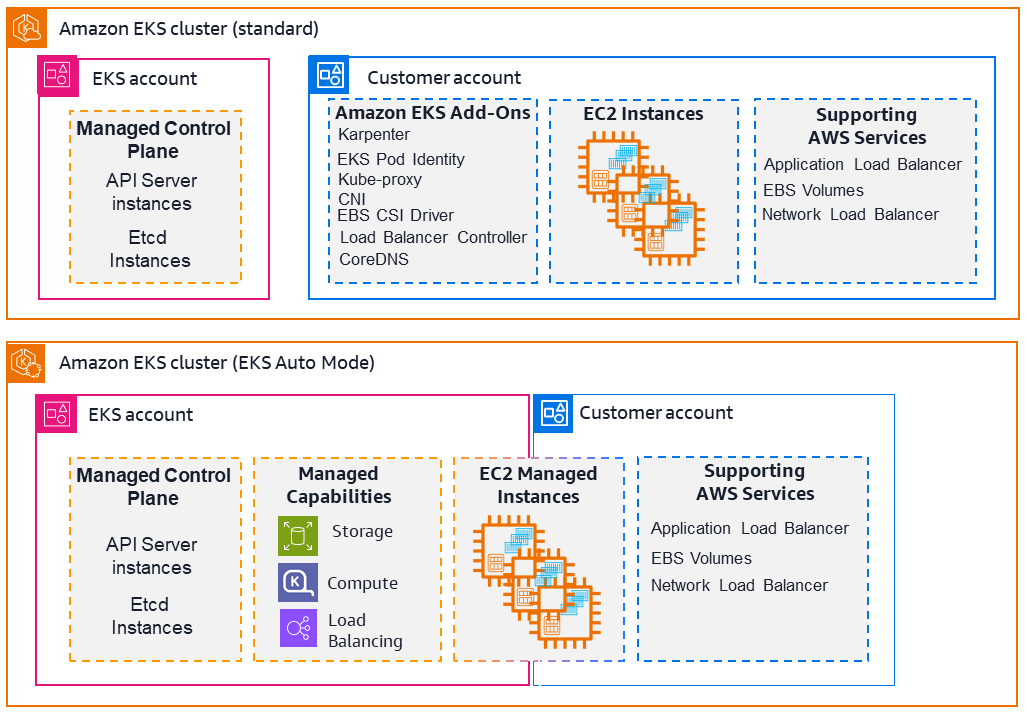
여기서는 EKS Standard를 쓰는데, 추가 비용이 내기 싫은 것도 있고, 직접 관리하기를 원하기 때문이다.
프로젝트에는 학습 목적도 있기에, Auto Mode등의 기능은 쓰지 않는 것이 더 도움될 듯 하기도 하다.
🧀 EKS Cluster
이 모듈은 코어 EKS control plane을 생성한다.
클러스터 자체와 control plane에 필요한 IAM role, 그리고 Kubernetes API에 대한 접근제어 등을 정의한다.
Public API 노출과 Private API노출을 토글가능하게 만들었으며, 이외에도 로깅 설정이나 Auto Mode비활성화 등의 설정이 들어있다.
main.tf
메인 리소스는 aws_eks_cluster 인데, EKS control plane을 생성한다.
Private mode를 설정가능하게 만들어서, Public Access 또는 Private Access를 전환할 수 있으며, Private인경우 bastion host가 접속할 수 있도록 VPC cidr로부터 보안그룹을 허용해주고 있다.
access_config에서는, authentication_mode = "API"를 써서, aws-auth ConfigMap를 이용한 구형 인증방식 대신 새로운 인증방식을 사용하도록 했다.
이 모듈은 또한 Control Plane에 필요한 IAM role도 생성하여, 클러스터 작업을 할 수 있도록 해준다.
기본적으로, EKS cluster는 ETCD암호화를 제공한다.
컴플라이언스 등으로 인해서CMK(Customer Managed Key) 를 원한다면, encryption_config 블록을 이용할 수 있다.
여기 에서 세부 정보를 확인가능하다.
 1
 2
 3
 4
 5
 6
 7
 8
 9
10
11
12
13
14
15
16
17
18
19
20
21
22
23
24
25
26
27
28
29
30
31
32
33
34
35
36
37
38
39
40
41
42
43
44
45
46
47
48
49
50
51
52
53
54
55
56
57
58
59
60
61
62
63
64
65
66
67
68
69
70
71
72
73
74
75
76
77
78
| resource "aws_security_group" "eks_control_plane_access" {
count = var.private_mode ? 1 : 0
name = "${var.cluster_name}-eks-control-plane-access"
description = "Allow bastion to reach EKS private API"
vpc_id = var.vpc_id
}
resource "aws_vpc_security_group_ingress_rule" "eks_api_from_vpc" {
count = var.private_mode ? 1 : 0
security_group_id = aws_security_group.eks_control_plane_access[0].id
cidr_ipv4 = var.vpc_cidr
ip_protocol = "tcp"
from_port = 443
to_port = 443
}
resource "aws_eks_cluster" "eks" {
name = var.cluster_name
access_config {
authentication_mode = "API"
}
role_arn = aws_iam_role.eks.arn
version = var.kubernetes_version
bootstrap_self_managed_addons = var.bootstrap_self_managed_addons
enabled_cluster_log_types = var.enabled_cluster_log_types
vpc_config {
subnet_ids = var.subnet_ids
endpoint_public_access = !var.private_mode
endpoint_private_access = var.private_mode
security_group_ids = aws_security_group.eks_control_plane_access[*].id
}
# Disable Auto-Mode
compute_config {
enabled = false
}
control_plane_scaling_config {
tier = var.cp_scaling_tier
}
upgrade_policy {
support_type = "STANDARD"
}
depends_on = [aws_iam_role_policy_attachment.cluster_AmazonEKSClusterPolicy]
}
# IAM Role for Contorl Plane
resource "aws_iam_role" "eks" {
name = "${var.cluster_name}-role"
assume_role_policy = jsonencode({
Version = "2012-10-17"
Statement = [
{
Action = [
"sts:AssumeRole",
"sts:TagSession"
]
Effect = "Allow"
Principal = {
Service = "eks.amazonaws.com"
}
},
]
})
}
resource "aws_iam_role_policy_attachment" "cluster_AmazonEKSClusterPolicy" {
policy_arn = "arn:aws:iam::aws:policy/AmazonEKSClusterPolicy"
role = aws_iam_role.eks.name
}
|
variables.tf
 1
 2
 3
 4
 5
 6
 7
 8
 9
10
11
12
13
14
15
16
17
18
19
20
21
22
23
24
25
26
27
28
29
30
31
32
33
34
35
36
37
38
39
40
41
42
43
44
45
46
47
48
49
50
51
52
53
| variable "cluster_name" {
description = "EKS cluster name"
type = string
}
variable "kubernetes_version" {
description = "EKS version"
type = string
}
variable "bootstrap_self_managed_addons" {
description = "Wheter to Enable VPC CNI and kube-proxy"
type = bool
default = true
}
variable "vpc_id" {
description = "VPC ID"
type = string
}
variable "vpc_cidr" {
description = "VPC CIDR Block"
type = string
}
variable "subnet_ids" {
description = "Subnet IDs"
type = list(string)
}
variable "private_mode" {
description = "Enable EKS private access"
type = string
}
variable "cp_scaling_tier" {
description = "Scaling tier for Control Plane"
type = string
default = "standard"
}
variable "enabled_cluster_log_types" {
type = set(string)
default = []
validation {
condition = alltrue([
for t in var.enabled_cluster_log_types :
contains(["api", "audit", "authenticator", "controllerManager", "scheduler"], t)
])
error_message = "enabled_cluster_log_types must contain only valid EKS control plane log types."
}
}
|
outputs.tf
기본적으로, 클러스터의 보안그룹이 생성된다.
vpc_config블록 안에서 cluster_security_group_id라는 attribute를 가진다.
더 자세한 내용은 여기에서 볼 수 있다.
 1
 2
 3
 4
 5
 6
 7
 8
 9
10
11
12
13
14
15
16
17
18
19
| output "cluster_name" {
value = aws_eks_cluster.eks.name
}
output "endpoint" {
value = aws_eks_cluster.eks.endpoint
}
output "ca_certificate" {
value = aws_eks_cluster.eks.certificate_authority[0].data
}
output "arn" {
value = aws_eks_cluster.eks.arn
}
output "cluster_security_group_id" {
value = aws_eks_cluster.eks.vpc_config[0].cluster_security_group_id
}
|
🔑 Access Entries
클러스터가 authentication_mode = "API"를 쓰기에, 클러스터의 액세스는 aws-auth ConfigMap 대신 access entries를 이용한다.
둘의 큰 차이는 어디에서 액세스가 관리되느냐이다.
aws-auth는 IAM-Kubernetes의 매핑이 클러스터 내부 ConfigMap에 저장되어있다.
Access entries는 AWS의 영역에서 관리된다.
새로운 모델이 더 선호되는데, IaC친화적이며, 관리 모델이 더 단순하고 깔끔하기 때문이다.
IAM user를 이용하는 것보다, IAM role을 assume하여 클러스터에 접근하는 것이 더 권장되는 패턴이다.
즉, 엔지니어가 role을 assume하여 클러스터에 해당 role로써 접근하는 것이다.
IAM role은 임시 자격증명을 이용한 방식이기에, IAM user보다 더 안전한 패턴이다.
또한, 운영의 관점에서도, role을 기반으로 인증하는 것이 더 자연스러운 접근이다.
IAM user가 IAM role을 assume하기 위해서는, "sts:AssumeRole" action을 해당 role에 대해 할 수 있어야 하며, 그 role은 trust policy로 해당 IAM user가 assume하는것을 허용해야 한다.
하나 짚고 가야하는건, EKS access entries가 Kubernetes RBAC를 대체하는 것은 아니라는 것이다.
Access Entries는 IAM principal이 클러스터에 접근할 수 있는지에 대한 것만 판단하고, Kubernetes RBAC는 해당 API작업을 할 수 있는지를 더 세부적으로 정한다.
즉, 두 개의 계층이 함께 동작한다.
이 모듈에서는 kubernetes_group라는 옵셔널한 필드가 있는데, 여기에 access entry가 kubernetes내부에서 어떤 그룹에 속하는지를 정할 수 있다.
더 많은 정보는 여기에서 볼 수 있다.
이 모듈은 두 개의 리소스로 구성된다:
aws_eks_access_entry, IAM principal을 EKS에 entry로 등록한다.aws_eks_access_policy_association, 액세스 정책을 entry에 붙일 수 있다.- 여기서의 액세스 정책은 RBAC와는 다른 EKS수준에서의 접근제어이다. 대략적인 접근제어가 가능하지만, RBAC만큼 정교하지는 못하다.
main.tf
aws_eks_access_entry 리소스는 하나의 IAM principal을 eks에 entry로 등록한다.
이후, aws_eks_access_policy_association 리소스는 map형태로 입력받아서, 여러 개의 policy를 추가할 수 있도록 설정하였다.
각 policy association 은 또한 access scope도 존재하는데, 클러스터 레벨 또는 namespace에 대해 접근 권한을 할당받을 수 있도록 되어있다.
 1
 2
 3
 4
 5
 6
 7
 8
 9
10
11
12
13
14
15
16
17
18
| resource "aws_eks_access_entry" "access" {
cluster_name = var.cluster_name
principal_arn = var.principal_arn
kubernetes_groups = var.kubernetes_groups
}
resource "aws_eks_access_policy_association" "access" {
for_each = var.eks_access_policy_association
cluster_name = var.cluster_name
principal_arn = var.principal_arn
policy_arn = each.value.policy_arn
access_scope {
type = each.value.access_scope_type
namespaces = each.value.namespaces
}
}
|
variables.tf
 1
 2
 3
 4
 5
 6
 7
 8
 9
10
11
12
13
14
15
16
17
18
19
20
21
22
23
24
25
26
27
28
29
30
31
| variable "cluster_name" {
description = "EKS cluster name"
type = string
}
variable "principal_arn" {
description = "IAM role ARN registering access policy"
type = string
}
variable "kubernetes_groups" {
description = "List of Kubernetes groups to assign to the principal"
type = list(string)
default = []
}
variable "eks_access_policy_association" {
type = map(object({
policy_arn = string
access_scope_type = string
namespaces = optional(list(string))
}))
default = {}
validation {
condition = alltrue([
for t in var.eks_access_policy_association :
contains(["namespace", "cluster"], t.access_scope_type)
])
error_message = "eks_access_policy_association must contain only 'namespace' or 'cluster'"
}
}
|
👪 Node Groups
EKS managed 노드 그룹은 워커 노드들의 프로비저닝과 생명 주기 관리를 자동화한다.
이 모듈은 여러 입력 변수들이 존재하는데, 인스턴스 타입이나 스케일링 제한, label, taint 등의 다양한 구성이 가능하도록 해야 하기 때문이다.
워커 노드들은 role과 AWS권한들이 일부 요구된다.
최소한으로, AmazonEKSWorkerNodePolicy, AmazonEC2ContainerRegistryPullOnly 가 있어야 EKS Control Plane에 연결될 수 있으며, ECR에서 이미지를 불러온다.
main.tf
코어 리소스는 aws_eks_node_group이다.
labels과 taints를 변수화하여 스케줄링 옵션에서 사용할 수 있도록 하였다.
예를 들어, 다른 애플리케이션들은 SPOT노드그룹에 올리더라도, 다른 운영 도구들은 ONDEMAND 인스턴스인 노드그룹에 올릴 수 있다.
desired_size는 상태 비교에서 무시되는데, 만약 추가 scale이 된경우에는 무시하여 설정 드리프트로 인식하지 않게 하기 위함이다.
 1
 2
 3
 4
 5
 6
 7
 8
 9
10
11
12
13
14
15
16
17
18
19
20
21
22
23
24
25
26
27
28
29
30
31
32
33
34
35
36
37
38
39
40
41
42
43
44
45
46
47
48
49
50
51
52
53
54
55
56
| resource "aws_eks_node_group" "ng" {
cluster_name = var.cluster_name
node_group_name = var.node_group_name
node_role_arn = aws_iam_role.ng.arn
ami_type = var.ami_type
instance_types = var.instance_types
subnet_ids = var.subnet_ids
capacity_type = var.capacity_type
disk_size = var.disk_size
scaling_config {
desired_size = var.scaling.desired_size
min_size = var.scaling.min_size
max_size = var.scaling.max_size
}
labels = var.labels
dynamic "taint" {
for_each = var.taints
content {
key = taint.value.key
value = taint.value.value
effect = taint.value.effect
}
}
lifecycle {
ignore_changes = [scaling_config[0].desired_size]
}
depends_on = [aws_iam_role_policy_attachment.ng_attachment]
}
resource "aws_iam_role" "ng" {
name = "${var.node_group_name}-role"
assume_role_policy = jsonencode({
Version = "2012-10-17"
Statement = [{
Action = "sts:AssumeRole"
Effect = "Allow"
Principal = {
Service = "ec2.amazonaws.com"
}
}]
})
}
resource "aws_iam_role_policy_attachment" "ng_attachment" {
for_each = var.role_policy_attachment
policy_arn = each.value
role = aws_iam_role.ng.name
}
|
variables.tf
 1
 2
 3
 4
 5
 6
 7
 8
 9
10
11
12
13
14
15
16
17
18
19
20
21
22
23
24
25
26
27
28
29
30
31
32
33
34
35
36
37
38
39
40
41
42
43
44
45
46
47
48
49
50
51
52
53
54
55
56
57
58
59
60
61
62
63
64
65
66
67
68
69
70
71
72
73
74
75
76
77
78
79
80
81
82
83
84
85
86
87
88
89
90
91
| variable "cluster_name" {
description = "Name of EKS Cluster"
type = string
}
variable "node_group_name" {
description = "Name of node group"
type = string
}
variable "subnet_ids" {
description = "ID list of subnet"
type = list(string)
}
variable "ami_type" {
description = "Type of AMI"
type = string
validation {
condition = contains([
"AL2_x86_64", "AL2_x86_64_GPU", "AL2_ARM_64", "CUSTOM",
"BOTTLEROCKET_ARM_64", "BOTTLEROCKET_x86_64",
"BOTTLEROCKET_ARM_64_FIPS", "BOTTLEROCKET_x86_64_FIPS",
"BOTTLEROCKET_ARM_64_NVIDIA", "BOTTLEROCKET_x86_64_NVIDIA",
"BOTTLEROCKET_ARM_64_NVIDIA_FIPS", "BOTTLEROCKET_x86_64_NVIDIA_FIPS",
"WINDOWS_CORE_2019_x86_64", "WINDOWS_FULL_2019_x86_64",
"WINDOWS_CORE_2022_x86_64", "WINDOWS_FULL_2022_x86_64",
"WINDOWS_CORE_2025_x86_64", "WINDOWS_FULL_2025_x86_64",
"AL2023_x86_64_STANDARD", "AL2023_ARM_64_STANDARD",
"AL2023_x86_64_NEURON", "AL2023_x86_64_NVIDIA", "AL2023_ARM_64_NVIDIA"
], var.ami_type)
error_message = "amiType does not match. check: https://docs.aws.amazon.com/eks/latest/APIReference/API_Nodegroup.html#AmazonEKS-Type-Nodegroup-amiType"
}
}
variable "instance_types" {
description = "List of instance type"
type = list(string)
}
variable "capacity_type" {
description = "Node Capacity Type"
type = string
validation {
condition = contains(["ON_DEMAND", "SPOT"], var.capacity_type)
error_message = "Valid value: <ON_DEMAND | SPOT>"
}
}
variable "disk_size" {
description = "Disk size for each worker node"
type = number
default = 20
}
variable "scaling" {
description = "Scaling Capacity"
type = object({
desired_size = number
min_size = number
max_size = number
})
}
variable "labels" {
description = "Node labels"
type = map(string)
}
variable "taints" {
description = "Taints for rule"
type = map(object({
key = string
value = optional(string)
effect = string
}))
validation {
condition = alltrue([
for _, v in var.taints :
contains(["NO_SCHEDULE", "NO_EXECUTE", "PREFER_NO_SCHEDULE"], v.effect)
])
error_message = "Valid effect: <NO_SCHEDULE | NO_EXECUTE | PREFER_NO_SCHEDULE>"
}
}
variable "role_policy_attachment" {
description = "Role policies to attach nodes"
type = set(string)
default = []
}
|
📲 Addons
EKS의 다른 부분들과는 다르게, 애드온들은 상대적으로 간단하다.
aws_eks_addon 리소스 하나로 되어서 굳이 모듈화할 필요는 없을 수 있지만, 일관된 형태를 위해 여기서는 모듈화하였다.
main.tf
1
2
3
4
| resource "aws_eks_addon" "addon" {
cluster_name = var.cluster_name
addon_name = var.addon_name
}
|
variables.tf
1
2
3
4
5
6
7
8
9
| variable "cluster_name" {
description = "Name of EKS Cluster"
type = string
}
variable "addon_name" {
description = "Name of Addon"
type = string
}
|
⛓️ Pod Identity Associations
EKS Pod Identity 는 Pod가 AWS 서비스를 IAM role을 할당받을 수 있도록 한다.
EC2 instance profile가 EC2 instance에게 자격증명을 부여하는 것과 비슷하게 동작하는데, 단위가 Kubernetes의 워크로드인 Pod인 것이다.
Worker Node와는 별도의 IAM role을 사용하여 실제 필요한 권한만 최소한으로 할당하도록 할 수 있다.
main.tf
우선, Pod에 할당한 IAM role을 만들어준다.
이후, AWS 서비스를 사용하기 위한 IAM Policy를 적절히 할당해준다.
마지막으로, pod identity association자원을 생성하여 IAM role이 namespace내부의 특정 serviceAccount에 할당되도록 한다.
Pod identity agent라는 daemonset이 클러스터 내부에서 동작하며, Pod에 임시 자격증명을 전달한다.
 1
 2
 3
 4
 5
 6
 7
 8
 9
10
11
12
13
14
15
16
17
18
19
20
21
22
23
24
25
26
27
28
29
30
31
| resource "aws_iam_role" "pod" {
name = var.role_name
assume_role_policy = jsonencode({
Version = "2012-10-17"
Statement = [
{
Effect = "Allow"
Principal = {
Service = "pods.eks.amazonaws.com"
}
Action = [
"sts:AssumeRole",
"sts:TagSession"
]
}
]
})
}
resource "aws_iam_role_policy_attachment" "pod" {
role = aws_iam_role.pod.name
policy_arn = var.policy_arn
}
resource "aws_eks_pod_identity_association" "association" {
cluster_name = var.cluster_name
namespace = var.namespace
service_account = var.service_account
role_arn = aws_iam_role.pod.arn
}
|
variables.tf
 1
 2
 3
 4
 5
 6
 7
 8
 9
10
11
12
13
14
15
16
17
18
19
20
21
22
23
24
| variable "cluster_name" {
description = "Name of EKS Cluster"
type = string
}
variable "role_name" {
description = "IAM role name to assign pod"
type = string
}
variable "policy_arn" {
description = "IAM policy arn"
type = string
}
variable "namespace" {
description = "Kubernetes namespace"
type = string
}
variable "service_account" {
description = "Name of serviceAccount"
type = string
}
|
🚪 (Optional) Bastion Host
Private API로 EKS를 노출한다면, 퍼블릭 인터넷으로는 접근할 수 없다.
즉, 같은 VPC에서 관리를 할 수 있는 bastion host가 필요하다.
Bastion host만이 정답은 아니다. 다른 옵션들 역시 존재한다.
Client VPN이나 Site-to-Site VPN등의 옵션도 있지만, 비용의 측면에서도 부담스러우며, 및 소규모 팀에서 쓰기에는 부적절하다고 생각되었다.
그래서 EC2 bastion host를 만들어서 AWS SSM을 이용한 접근으로 클러스터를 관리할 수 있는 워크스테이션을 만드는 것을 선택했다.
main.tf
이 모듈은 작은 EC2인스턴스를 생성한다.
대신, ssh기반의 접속이 아닌, SSM으로 외부 인터넷 노출 포트 없이 더 안전하다.
또한, SSH키의 관리와 추가 보안그룹 규칙 관리 등의 부담도 없어진다.
eks:DescribeCluster 를 실행할 수 있도록 IAM policy를 할당해준다.
aws eks update-kubeconfig 를 통해서 kuberntes api에 접근할 수 있게 된다.
  1
  2
  3
  4
  5
  6
  7
  8
  9
 10
 11
 12
 13
 14
 15
 16
 17
 18
 19
 20
 21
 22
 23
 24
 25
 26
 27
 28
 29
 30
 31
 32
 33
 34
 35
 36
 37
 38
 39
 40
 41
 42
 43
 44
 45
 46
 47
 48
 49
 50
 51
 52
 53
 54
 55
 56
 57
 58
 59
 60
 61
 62
 63
 64
 65
 66
 67
 68
 69
 70
 71
 72
 73
 74
 75
 76
 77
 78
 79
 80
 81
 82
 83
 84
 85
 86
 87
 88
 89
 90
 91
 92
 93
 94
 95
 96
 97
 98
 99
100
101
102
103
104
105
106
107
108
109
110
111
112
113
114
| data "aws_ami" "ubuntu" {
most_recent = true
filter {
name = "name"
values = ["ubuntu/images/hvm-ssd-gp3/ubuntu-noble-24.04-arm64-server-*"]
}
filter {
name = "virtualization-type"
values = ["hvm"]
}
owners = ["099720109477"] # Canonical
}
resource "aws_security_group" "bastion" {
name = "bastion_ssm"
description = "Deny inbound traffic and allow outbound traffic"
vpc_id = var.vpc_id
}
resource "aws_vpc_security_group_egress_rule" "bastion_internet" {
security_group_id = aws_security_group.bastion.id
cidr_ipv4 = "0.0.0.0/0"
from_port = 443
ip_protocol = "tcp"
to_port = 443
}
resource "aws_iam_instance_profile" "ssm" {
name = "${var.name}-profile"
role = aws_iam_role.bastion.id
}
resource "aws_instance" "bastion" {
ami = data.aws_ami.ubuntu.id
instance_type = var.instance_type
subnet_id = var.subnet_id
vpc_security_group_ids = [aws_security_group.bastion.id]
associate_public_ip_address = var.associate_public_ip_address
iam_instance_profile = aws_iam_instance_profile.ssm.name
metadata_options {
http_tokens = "required"
}
root_block_device {
encrypted = true
volume_type = "gp3"
}
user_data = file("${path.module}/user_data.sh")
user_data_replace_on_change = true
tags = {
Name = var.name
}
}
resource "aws_iam_role" "bastion" {
name = var.name
path = "/"
assume_role_policy = jsonencode({
Version = "2012-10-17"
Statement = [
{
Sid = "AllowEC2SSM"
Effect = "Allow"
Action = [
"sts:AssumeRole"
]
Principal = {
Service = "ec2.amazonaws.com"
}
}
]
})
tags = {
Purpose = "Bastion"
}
}
resource "aws_iam_role_policy_attachment" "bastion_ssm" {
role = aws_iam_role.bastion.name
policy_arn = "arn:aws:iam::aws:policy/AmazonSSMManagedInstanceCore"
}
data "aws_iam_policy_document" "bastion_access_eks" {
statement {
sid = "AllowEKStoBastion"
actions = [
"eks:DescribeCluster"
]
resources = [
var.eks_arn
]
}
}
resource "aws_iam_policy" "bastion_access_eks" {
name = "${var.name}-access-eks"
path = "/"
policy = data.aws_iam_policy_document.bastion_access_eks.json
}
resource "aws_iam_role_policy_attachment" "bastion_access_eks" {
role = aws_iam_role.bastion.name
policy_arn = aws_iam_policy.bastion_access_eks.arn
}
|
user_data.sh
인프라 도구들을 미리 설치시키고, 쉘 설정들도 일부 넣어준다.
이 스크립트를 통해 bastion host가 VPC내부의 워크스테이션이 되게 해준다.
 1
 2
 3
 4
 5
 6
 7
 8
 9
10
11
12
13
14
15
16
17
18
19
20
21
22
23
24
25
26
27
28
29
30
31
32
33
34
35
36
37
38
39
40
41
42
43
44
45
46
47
48
49
50
51
52
53
54
55
56
57
58
59
60
61
62
63
64
65
66
| #!/usr/bin/env bash
set -euo pipefail
export DEBIAN_FRONTEND=noninteractive
apt-get update
apt-get upgrade -y
apt-get install -y apt-transport-https ca-certificates curl gnupg unzip
# kubectl
mkdir -p /etc/apt/keyrings
curl -fsSL https://pkgs.k8s.io/core:/stable:/v1.35/deb/Release.key |
gpg --dearmor -o /etc/apt/keyrings/kubernetes-apt-keyring.gpg
echo 'deb [signed-by=/etc/apt/keyrings/kubernetes-apt-keyring.gpg] https://pkgs.k8s.io/core:/stable:/v1.35/deb/ /' \
>/etc/apt/sources.list.d/kubernetes.list
apt-get update
apt-get install -y kubectl
# OpenTofu
install -m 0755 -d /etc/apt/keyrings
curl -fsSL https://get.opentofu.org/opentofu.gpg | tee /etc/apt/keyrings/opentofu.gpg >/dev/null
curl -fsSL https://packages.opentofu.org/opentofu/tofu/gpgkey | gpg --dearmor -o /etc/apt/keyrings/opentofu-repo.gpg
chmod a+r /etc/apt/keyrings/opentofu.gpg /etc/apt/keyrings/opentofu-repo.gpg
cat >/etc/apt/sources.list.d/opentofu.list <<'EOF'
deb [signed-by=/etc/apt/keyrings/opentofu.gpg,/etc/apt/keyrings/opentofu-repo.gpg] https://packages.opentofu.org/opentofu/tofu/any/ any main
deb-src [signed-by=/etc/apt/keyrings/opentofu.gpg,/etc/apt/keyrings/opentofu-repo.gpg] https://packages.opentofu.org/opentofu/tofu/any/ any main
EOF
apt-get update
apt-get install -y tofu
ARCH="$(uname -m)"
case "$ARCH" in
x86_64)
AWSCLI_URL="https://awscli.amazonaws.com/awscli-exe-linux-x86_64.zip"
;;
aarch64 | arm64)
AWSCLI_URL="https://awscli.amazonaws.com/awscli-exe-linux-aarch64.zip"
;;
*)
echo "Unsupported architecture: $ARCH"
exit 1
;;
esac
curl -fsSL "$AWSCLI_URL" -o "awscliv2.zip"
unzip -o awscliv2.zip
./aws/install
# SSM Agent
snap install amazon-ssm-agent --classic || true
systemctl enable snap.amazon-ssm-agent.amazon-ssm-agent.service || true
systemctl restart snap.amazon-ssm-agent.amazon-ssm-agent.service || true
# Shell
curl -fsSL https://starship.rs/install.sh | sh -s -- -y
cat <<'EOF' >>/home/ubuntu/.bashrc
eval "$(starship init bash)"
alias k='kubectl'
EOF
chown ubuntu:ubuntu /home/ubuntu/.bashrc
|
variables.tf
 1
 2
 3
 4
 5
 6
 7
 8
 9
10
11
12
13
14
15
16
17
18
19
20
21
22
23
24
25
26
27
28
29
30
| variable "name" {
description = "Name of the instance"
type = string
}
variable "vpc_id" {
description = "VPC ID"
type = string
}
variable "subnet_id" {
description = "Subnet ID"
type = string
}
variable "instance_type" {
description = "EC2 Instance Type"
type = string
default = "t4g.nano"
}
variable "eks_arn" {
description = "EKS Arn"
type = string
}
variable "associate_public_ip_address" {
description = "Associate public IP address"
type = bool
}
|
outputs.tf
1
2
3
4
5
6
7
| output "bastion_id" {
value = aws_instance.bastion.id
}
output "bastion_role_arn" {
value = aws_iam_role.bastion.arn
}
|
🚀 Modules 사용하기
아래는 모듈의 사용 예시이다.
  1
  2
  3
  4
  5
  6
  7
  8
  9
 10
 11
 12
 13
 14
 15
 16
 17
 18
 19
 20
 21
 22
 23
 24
 25
 26
 27
 28
 29
 30
 31
 32
 33
 34
 35
 36
 37
 38
 39
 40
 41
 42
 43
 44
 45
 46
 47
 48
 49
 50
 51
 52
 53
 54
 55
 56
 57
 58
 59
 60
 61
 62
 63
 64
 65
 66
 67
 68
 69
 70
 71
 72
 73
 74
 75
 76
 77
 78
 79
 80
 81
 82
 83
 84
 85
 86
 87
 88
 89
 90
 91
 92
 93
 94
 95
 96
 97
 98
 99
100
101
102
103
104
105
106
107
108
109
110
111
112
113
114
115
116
117
118
119
120
121
122
123
124
125
126
127
128
129
130
131
132
133
134
135
136
137
138
139
140
141
142
143
144
145
146
147
148
149
150
151
152
153
154
155
156
157
158
159
160
161
162
163
164
165
166
167
| ##########
# locals #
##########
locals {
vpc_cidr = "10.0.0.0/16"
# Enable/disable EKS private access
eks_private_mode = true
# EKS Addon list
eks_addons = toset([
"coredns",
"kube-proxy",
"vpc-cni",
"aws-ebs-csi-driver",
"eks-pod-identity-agent",
])
# Pod identity associations
pod_identity_associations = {
vpc_cni = {
role_name = "${var.cluster_name}-vpc-cni"
policy_arn = "arn:aws:iam::aws:policy/AmazonEKS_CNI_Policy"
namespace = "kube-system"
service_account = "aws-node"
}
ebs_csi = {
role_name = "${var.cluster_name}-ebs-csi"
policy_arn = "arn:aws:iam::aws:policy/service-role/AmazonEBSCSIDriverPolicy"
namespace = "kube-system"
service_account = "ebs-csi-controller-sa"
}
}
}
########################################################
# EKS - Cluster #
# #
# NOTE: #
# By default, EKS secrets are protected with enveloped #
# encryption in EKS version 1.28 or higher #
########################################################
module "eks_cluster" {
source = "../../../modules/eks-cluster"
cluster_name = var.cluster_name
kubernetes_version = "1.35"
vpc_id = module.vpc.vpc_id
vpc_cidr = local.vpc_cidr
subnet_ids = module.vpc.private_subnet_ids
private_mode = local.eks_private_mode
enabled_cluster_log_types = []
cp_scaling_tier = "standard"
}
######################
# EKS - Access Entry #
######################
module "eks_access_entry_private" {
count = local.eks_private_mode ? 1 : 0
source = "../../../modules/eks-access-entry"
# Use module output instead of var.cluter_name because of the dependency implication.
cluster_name = module.eks_cluster.cluster_name
principal_arn = module.bastion[0].bastion_role_arn
eks_access_policy_association = {
clusteradmin = {
policy_arn = "arn:aws:eks::aws:cluster-access-policy/AmazonEKSClusterAdminPolicy"
access_scope_type = "cluster"
}
}
}
module "eks_access_entry_public" {
count = local.eks_private_mode ? 0 : 1
source = "../../../modules/eks-access-entry"
cluster_name = module.eks_cluster.cluster_name
principal_arn = data.terraform_remote_state.shared.outputs.eks_fullaccess_role_arn
eks_access_policy_association = {
clusteradmin = {
policy_arn = "arn:aws:eks::aws:cluster-access-policy/AmazonEKSClusterAdminPolicy"
access_scope_type = "cluster"
}
}
}
#####################################
# EKS - Node Group #
# Desired Node group size is ignored #
# when comparing the state #
#####################################
module "eks_node_group" {
source = "../../../modules/eks-node-group"
cluster_name = module.eks_cluster.cluster_name
node_group_name = "${var.cluster_name}-ng"
ami_type = "AL2023_ARM_64_STANDARD"
subnet_ids = module.vpc.private_subnet_ids
instance_types = ["t4g.large"]
capacity_type = "ON_DEMAND"
disk_size = 20
scaling = {
desired_size = 2
min_size = 2
max_size = 4
}
labels = {
NodeGroupName = "default"
}
taints = {}
# Role policy Attachment
role_policy_attachment = [
"arn:aws:iam::aws:policy/AmazonEKSWorkerNodePolicy",
"arn:aws:iam::aws:policy/AmazonEC2ContainerRegistryPullOnly"
]
}
################
# EKS - Addons #
################
module "eks-addons" {
source = "../../../modules/eks-addons"
for_each = local.eks_addons
cluster_name = module.eks_cluster.cluster_name
addon_name = each.value
}
###################################
# EKS - Pod identity associations #
###################################
module "pod_identity_association" {
source = "../../../modules/eks-pod-identity-association"
for_each = local.pod_identity_associations
cluster_name = module.eks_cluster.cluster_name
role_name = each.value.role_name
policy_arn = each.value.policy_arn
namespace = each.value.namespace
service_account = each.value.service_account
}
################
# Bastion Host #
################
module "bastion" {
count = local.eks_private_mode ? 1 : 0
source = "../../../modules/ec2-ssm-bastion"
name = "bastion-prod"
vpc_id = module.vpc.vpc_id
subnet_id = module.vpc.private_subnet_ids[0]
instance_type = "t4g.nano"
eks_arn = module.eks_cluster.arn
associate_public_ip_address = false
}
|
🪪 EKS Cluster에 접속
EKS가 퍼블릭 API를 노출한다면, kubeconfig를 업데이트하여 로컬 환경에서 바로 접근할 수 있다.
1
2
| # Add --role-arn <role-arn> if you need to assume a role
aws eks update-kubeconfig --region <region> --name <cluster-name>
|
클러스터가 private mode에서 돌아간다면, ssm으로 bastion host에 들어가는 것이 먼저이다.
1
| aws ssm start-session --target <instance-id>
|
이후, 안에서 kubeconfig를 업데이트해주면 된다.
➡️ 더 해야 할 일들
EKS 클러스터를 프로비저닝 하는 것은 이제 시작일 뿐이다.
클러스터 내부에 운영을 위해 더 설치를 고려해야 하는 것들이 더 많다:
예를 들면, 아래와 같다:
- ArgoCD 를 통한 GitOps
- cert-manager 를 통한 TLS연결
- AWS Load Balancer Controller 를 통한 Load Balancer연동
- Karpenter 를 통한 노드 오토스케일링
- Gateway API CRD
- 관찰성(Observability) 스택
- 이외 더 많은 운영 도구들
AWS EKS Capabilities를 고려할 수도 있다.
📚 References